


Published by GFXToolz AI | Last updated: March 2026
Backlinks are the number one off-page ranking factor in 2026. Google’s original algorithm was built on the idea that links from other websites act as votes of confidence. More quality votes, higher rankings. But here’s what most beginners get wrong: they focus on getting backlinks before they understand how to analyse them.
Knowing how to check backlinks comes first. Before you build a single link, you need to understand what your current profile looks like, what your competitors’ profiles look like, which links are helping and which might be hurting, and where the best opportunities are hiding.
This guide covers everything from scratch: free tools, paid tools, step-by-step workflows, quality metrics in plain language, and a 5-step monthly audit checklist you can run on any budget.
What are backlinks (and why do they still matter in 2026)
A backlink is a link from someone else’s website to yours. When The Hindu links to your blog post, that’s a backlink. When a small directory lists your URL, that’s also a backlink. Google treats both very differently.
The reasoning behind it: if credible websites link to your page, Google infers your page is trustworthy and useful. Those external references influence how prominently your content ranks in search results.
2026 update — quality over quantity. One link from a respected publication with genuine traffic is worth more than 1,000 links from directories created yesterday. Google’s John Mueller has confirmed this direction: “We try to understand which links are relevant and helpful for users, and those are the ones that tend to matter more.”
AI search context. This matters beyond traditional Google rankings now. Pages with strong backlink profiles appear more frequently in AI-generated answers from ChatGPT, Perplexity, and Google AI Overviews. AI models use backlinks as a proxy for authority when deciding which sources to cite. A solid backlink profile in 2026 affects both traditional organic traffic and AI-mediated visibility.
How to check your own backlinks (3 methods)
Method 1: Google Search Console (free)
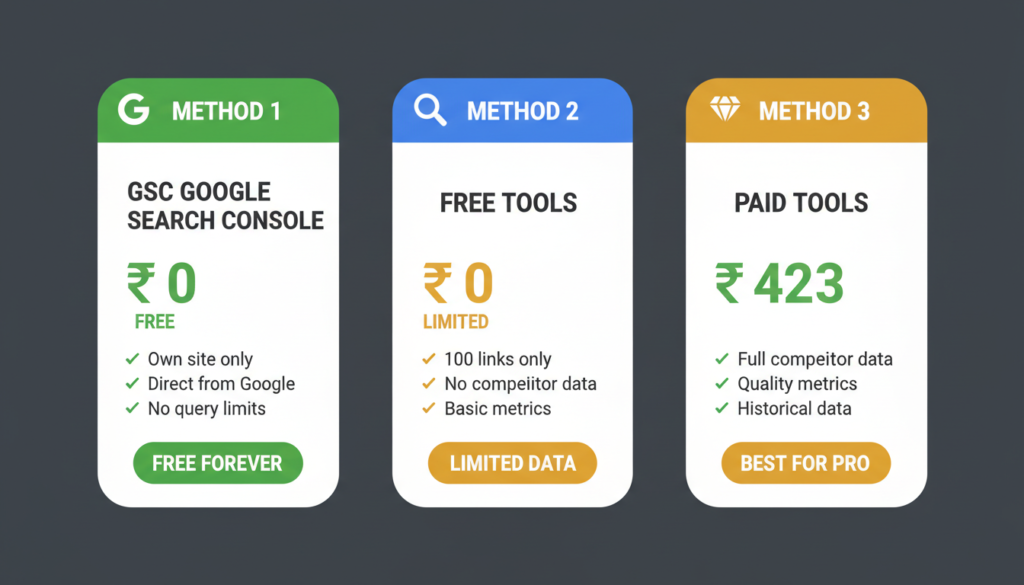
For checking backlinks for free, this is your starting point. GSC is the most authoritative free source for your own site’s backlink data — the information comes directly from Google’s index.
- Log into Google Search Console (search.google.com/search-console)
- Select your property from the dropdown
- Click “Links” in the left sidebar
- You’ll see four reports: Top linking sites, Top linked pages, Top linking text, Top target pages
- Export any report using the export icon (top right of each section)
What GSC does well: Shows exactly which domains Google has credited as linking to you. As the data comes from Google itself, it’s authoritative for understanding what Google actually sees. Completely free, no query limits.
What GSC doesn’t do: It only covers your own site. You can’t use it to analyse competitors. It provides no quality metrics — no Domain Rating, no spam score. You see the link, not how valuable it is.
Best for: quick health checks, identifying top referrers, spotting new links after a content publication, monitoring whether links you’ve built are being indexed.
Method 2: free backlink checker tools
Several free tools give you partial access with real limitations:
Ahrefs Free Backlink Checker: Shows the top 100 backlinks to any domain. DR and UR metrics included. Limitation: 100 links only, no historical data. Good for a quick snapshot.
Moz Link Explorer (free tier): 10 queries per month. Shows Domain Authority, Page Authority, and spam score. Very restricted.
Ubersuggest (free): 3 searches per day. Basic backlink data with limited metrics.
SEO SpyGlass (free desktop version): Can pull more data than browser-based free tools but requires installation and has export limits.
These tools work for occasional spot-checks. They won’t give you complete referring domain lists, historical data, or reliable quality metrics — which is what professional backlink analysis actually requires.
Method 3: paid tools (Ahrefs, Semrush, Moz)
This is where how to check backlinks gets genuinely powerful.
Ahrefs Site Explorer has the largest backlink database available — 35 trillion+ links indexed. Domain Rating and URL Rating are the most accurate authority metrics in the industry. Historical data lets you see when links were gained or lost. Best tool for competitor backlink analysis.
Semrush Backlink Analytics offers comprehensive link data alongside a toxicity scoring system that identifies potentially harmful links. The Backlink Audit feature integrates directly with Google Search Console for a complete picture.
Moz Link Explorer introduced the Domain Authority metric that became an industry standard. Spam Score is useful for identifying risky links. Good for DA/spam-focused analysis, though the index is smaller than Ahrefs.
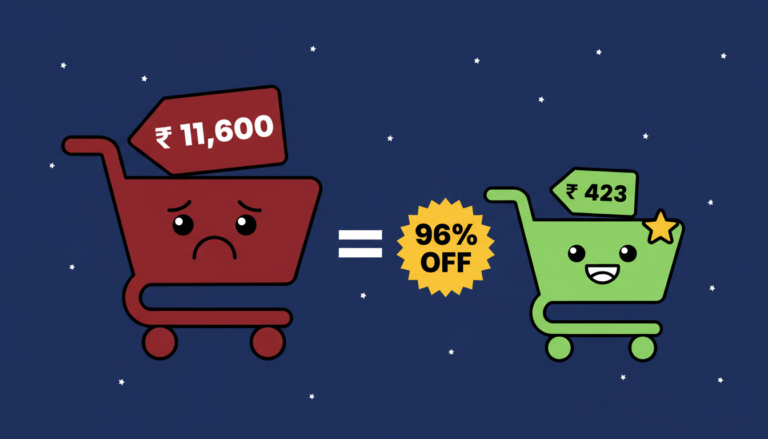
The cost barrier: Ahrefs ₹10,700/month. Semrush ₹11,600/month. Moz ₹8,400/month.
The most practical path for Indian beginners: GFXToolz Basic at ₹423/month includes all three alongside 100+ other tools. That’s the complete professional backlink checker toolkit for less than 2% of the combined retail price.
Understanding backlink quality metrics
Knowing how to analyse backlinks means understanding what the metrics actually mean.
Domain Rating / Domain Authority (DR/DA)
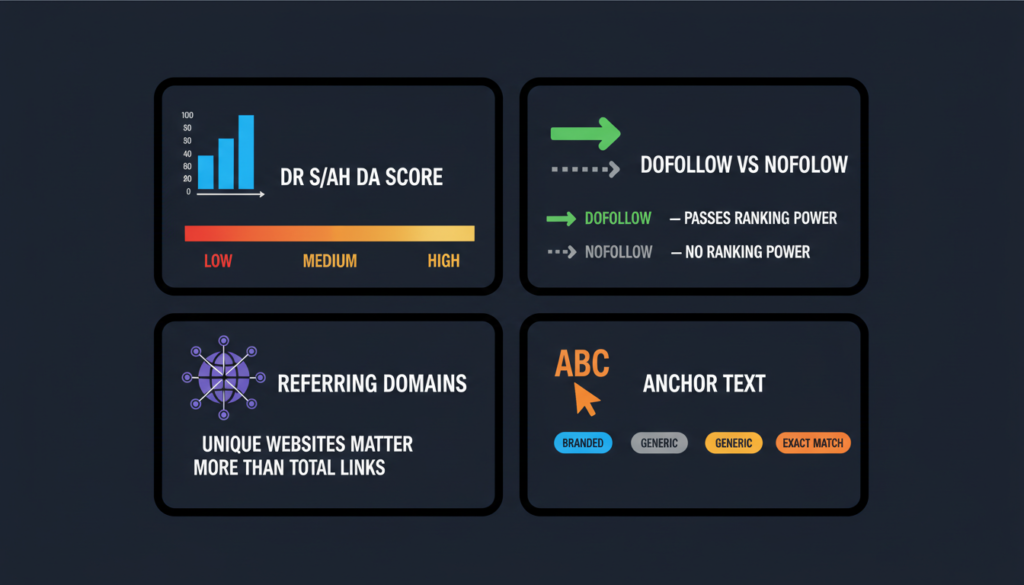
DR is Ahrefs’ metric. DA is Moz’s. Both measure a website’s overall authority on a 0–100 logarithmic scale. The scales aren’t identical — DR 50 and DA 50 don’t represent exactly the same level of authority — but both are useful directional indicators.
Practical benchmarks:
- DR/DA 70+: Major news sites, large publications, industry authorities. Links from here carry significant weight
- DR/DA 40–70: Established niche blogs, regional publications, credible industry sites. Good quality
- DR/DA 20–40: Smaller blogs, newer sites building authority. Lower value but legitimate
- DR/DA 0–20: New or low-authority sites. Minimal ranking value
One important nuance: relevance can outweigh raw authority. A DR 35 link from a well-established Indian digital marketing blog may deliver more ranking benefit than a DR 65 link from an unrelated international lifestyle site. Google weighs topical context heavily — a number tells you about authority, not about fit.
Dofollow vs nofollow
Dofollow links pass ranking power. When a site links to you without any special attribute, it’s dofollow by default. These directly influence your search rankings.
Nofollow links include a rel=”nofollow” attribute telling search engines not to pass ranking credit. Most social media links are nofollow. Wikipedia links are nofollow. Blog comment links are typically nofollow.
Nofollow links still have value — they drive referral traffic, build brand awareness, and contribute to a natural-looking profile. But when evaluating backlinks for ranking purposes, your attention belongs on dofollow links. In Ahrefs and Semrush, you can filter reports to show dofollow only.
Referring domains vs total backlinks
This is the most commonly misunderstood metric in backlink analysis.
Total backlinks counts every individual link, including multiple links from the same website. Referring domains counts unique websites linking to you.
Referring domains matters more. 100 backlinks from 100 different websites tells Google that 100 independent sources endorsed your content. 100 backlinks from the same website tells Google that one source linked to you a lot — possibly through site-wide navigation links.
When benchmarking against competitors, always compare referring domain counts, not total backlink counts. A competitor with 500 backlinks from 400 referring domains has a much stronger profile than one with 1,000 backlinks from 15 referring domains.
Anchor text
Anchor text is the clickable text that contains a link. A healthy, natural anchor text profile contains a diverse mix:
- Branded: your company or product name (“GFXToolz”, “GFXToolz AI”)
- Generic: “click here,” “read more,” “this post”
- URL: the raw URL itself (“gfxtoolz.ai”)
- Partial match: related terms without keyword stuffing (“affordable SEO tools”)
- Exact match: your target keyword exactly (“group buy SEO tools India”)
Red flag: if 70–80% of your backlinks use the same exact-match keyword anchor, that looks manipulative to Google’s algorithms. Natural link acquisition produces diverse anchors because different people describe your content differently.
When analysing competitor backlinks, check their anchor text distribution. Sites with unnaturally concentrated exact-match anchors may be at risk of future algorithmic penalties.
Link relevance
A link from an SEO tools blog to your SEO tools platform is topically relevant. A link from a wedding photography blog to the same platform raises an obvious question: why is that site linking here?
Google weights topical relevance when assessing link value. Two links with identical DR/DA scores can have very different real-world impact depending on how relevant the linking site is to your niche. When building links, prioritise sites in your industry or adjacent industries. When evaluating competitor backlinks, note whether their strongest links come from relevant sources or from random high-DA sites with no clear connection.
How to analyse competitor backlinks (step-by-step)
This is the most actionable part of any backlink analysis. Understanding what’s working for competitors tells you exactly what to replicate.
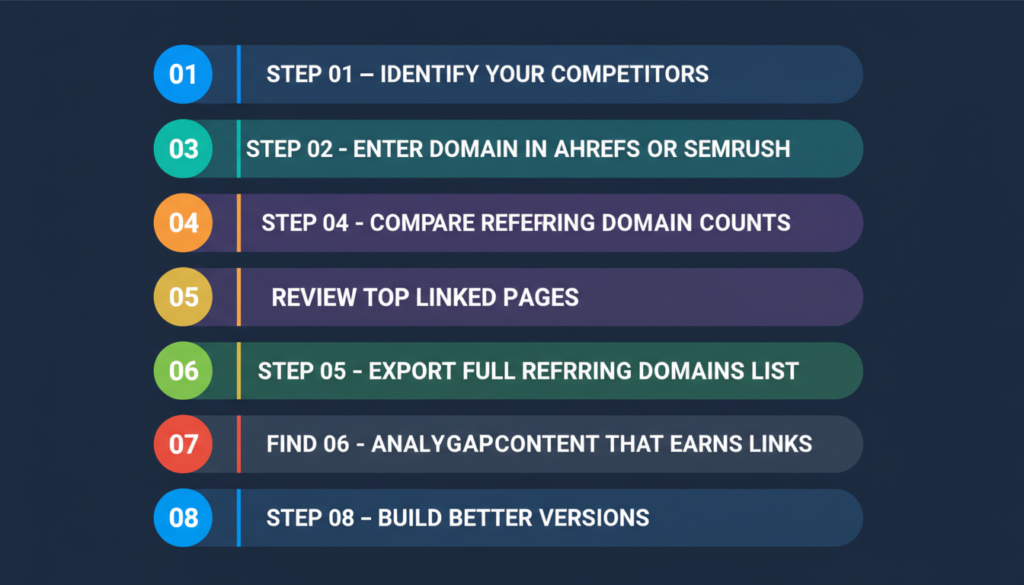
Step 1: identify your competitors. Google your main target keywords. Note the 3–5 domains that consistently appear in the top 10 results. For an Indian SEO blog, check sites like Webjinnee, WPBlogging101, or Clickorich. For a group buy platform, check what’s ranking for “best group buy SEO tools India.”
Step 2: enter each competitor’s domain into Ahrefs Site Explorer or Semrush Backlink Analytics. Start with Domain Overview: total referring domains, top linked pages, overall DR/Authority Score.
Step 3: compare referring domain counts. Who has the strongest profile? This gives you a benchmark. If the top competitor has 800 referring domains and you have 50, you understand the gap you’re working to close.
Step 4: review their top linked pages. Which specific pages have earned the most backlinks? This reveals what content formats and topics attract links in your niche. Is it data-driven guides? Comparison posts? Free tools? Original research?
Step 5: export the full referring domains list. In Ahrefs: Site Explorer → Backlinks → Referring domains → Export. In Semrush: Backlink Analytics → Referring Domains → Export.
Step 6: find link gap opportunities. Ahrefs has “Link Intersect.” Semrush has “Backlink Gap.” Both let you enter your domain and competitor domains simultaneously, then show which sites link to competitors but not to you. These are your best outreach targets — they’ve already demonstrated willingness to link to content in your niche.
Step 7: analyse the content that earns links. Visit the competitor’s most-linked pages. Read them. Understand why other sites chose to link. Is the content uniquely comprehensive? Does it include original data? Is it the definitive resource on a topic? This tells you what quality bar you need to clear.
Step 8: build better versions. Identify a competitor’s most-linked content. Read it properly. Then create something more comprehensive, more current, and more useful — not just longer. Once it’s live, reach out to the sites that linked to the original. You’re not asking them to replace the link out of goodwill; you’re offering them an upgrade to something their readers will find more valuable. That framing matters for response rates.
Indian context example: If you run a digital marketing blog for Indian small businesses, check which posts on competitor blogs like Digital Deepak or Marketing Mind earn the most backlinks. If it’s a “complete guide to Google Ads in India” with 40 linking domains, build a more thorough, updated version with current India-specific data and case studies.
Toxic backlinks: when to worry (and when not to)
What toxic backlinks are
A toxic backlink comes from a site Google considers low-quality, manipulative, or associated with spam: link farms, private blog networks (PBNs), hacked sites injected with spam links, adult or gambling sites unrelated to your niche, mass directories with no editorial standards.
The disavow tool gets misused constantly
Google is significantly better at ignoring bad links than most SEO content implies.
Google’s Gary Illyes has stated publicly: “In most cases, Google can assess which links to trust. The disavow tool is for very specific situations.” Google’s John Mueller has reinforced this: if you’ve received bad links you didn’t ask for, Google’s algorithms typically handle it without intervention.
The disavow tool is widely misused by beginners who panic at any low-DR link in their profile. The actual risk: many beginners disavow legitimate low-authority links they don’t recognise, removing real ranking signal in the process. That’s worse than leaving the bad links alone.
Unless there’s a specific reason to believe your link profile is directly causing a ranking drop or penalty, the right action is usually nothing.
When you should actually disavow
You’ve received a Manual Action notification in Google Search Console for “Unnatural links pointing to your site.” This is Google explicitly telling you there’s a detected problem that needs addressing.
You participated in a link scheme. Paid for links, traded links in volume, or used a service that built spammy links on your behalf. You know the links are bad because you or someone you hired created them.
You inherited a mess from a previous SEO agency or freelancer. If they built spammy links and you have the list, disavow those specific links.
If none of these scenarios apply, leave your disavow file alone. The risk of accidentally removing beneficial links is greater than the risk of leaving low-quality organic links in place.
Your first backlink audit: 5-step checklist
A repeatable routine you can run monthly in 30–60 minutes.
Step 1: establish your baseline numbers. Open Ahrefs or Semrush and note: total referring domains, total backlinks, Domain Rating/Authority Score. Track these monthly in a spreadsheet. Patterns over three to six months tell you more than any single snapshot.
Step 2: review your top linking domains. Sort referring domains by DR/Authority Score. Are your top referrers relevant, legitimate sites, or spam directories and irrelevant foreign sites? For each of your top 20 referring domains, ask: is this a site I’d be comfortable showing a client?
Step 3: check anchor text distribution. Is your distribution diverse (branded + generic + URL + partial match) or suspiciously concentrated on exact-match keywords? More than 40–50% of anchors being the same keyword phrase is worth investigating.
Step 4: monitor new vs lost backlinks. Look at the past 30–60 days. Gaining new referring domains consistently suggests content is earning citations naturally. Significant link loss may mean sites that linked to you have been updated, removed content, or changed their link policies — worth checking.
Step 5: compare your profile against 2–3 competitors. How does your referring domain count compare to sites ranking above you for your target keywords? This gap tells you approximately how much link building work separates you from a competitive position. Focus on the quality of their top links, not just the quantity.
Full audit with Ahrefs or Semrush: 30–40 minutes. With free tools only: 60–90 minutes. Run monthly.
Free vs paid backlink tools
| Tool | Monthly cost | Own site data | Competitor analysis | Quality metrics | Historical data |
|---|---|---|---|---|---|
| Google Search Console | ₹0 | Yes | No | None | Limited |
| Ahrefs Free Checker | ₹0 | Top 100 only | Top 100 only | DR/UR | No |
| Moz Free | ₹0 | 10 queries/month | 10 queries/month | DA/Spam Score | No |
| Ahrefs (direct) | ₹10,700 | Full | Full | DR/UR (best accuracy) | Yes |
| Semrush (direct) | ₹11,600 | Full | Full | Authority Score + Toxicity | Yes |
| Moz (direct) | ₹8,400 | Full | Full | DA/Spam Score | Yes |
| GFXToolz Basic | ₹423 | All three tools | All three tools | All metrics | Yes |
| NoxTools | ₹249 | Basic | Basic | Basic | Limited |
| Toolzbuy | ₹269 | 50+ tools included | Standard | Standard | Limited |
Use Google Search Console for free monthly checks on your own site. When you need competitor analysis, quality scoring, or historical data, access Ahrefs and Semrush through GFXToolz at ₹423/month — both tools plus Moz and 100+ others for less than 4% of their combined retail cost.
FAQ
How do I check my website’s backlinks for free? Google Search Console (Links section in the left sidebar) is the best free option for your own site. For limited competitor data, use Ahrefs’ free backlink checker (top 100 links) or Moz Link Explorer free tier (10 queries/month). For complete data with quality metrics and competitor analysis, access Ahrefs and Semrush through GFXToolz starting at ₹423/month.
What makes a good backlink vs a bad one? Good backlinks come from relevant, authoritative sites (high DR/DA), are dofollow, use natural anchor text, and come from pages with real organic traffic. Bad backlinks come from spam directories, link farms, unrelated sites, or use manipulative keyword-heavy anchors. Relevance and authority should always be evaluated together, not separately.
How many backlinks do I need to rank? There’s no universal number. Competition level determines it. For low-competition long-tail keywords, 5–10 quality referring domains may be enough. For competitive head terms, hundreds may be required. Check how many referring domains the current top 5 results have for your target keyword in Ahrefs or Semrush — that’s the actual number you’re working toward, not a generalisation.
Should I disavow bad backlinks? In most cases, no. Google is effective at discounting spammy links automatically. Only use the disavow tool if you’ve received a Manual Action notification in Google Search Console specifically for unnatural links, or if you know you built the bad links yourself. Beginners who disavow without clear cause regularly remove legitimate links by mistake.
How often should I check my backlinks? Run a full audit monthly using Ahrefs or Semrush. Use Google Search Console weekly for quick checks on new links and top referrers. Compare your profile against competitors quarterly. After any major Google algorithm update, run an immediate check to see whether referring domain counts or ranking positions have shifted.
Can I do backlink analysis without expensive tools? For your own site: yes, with Google Search Console. For competitor analysis and quality metrics: not effectively. Free tools cap queries, limit results to 100 links, and lack historical data. The most affordable path for Indian users is GFXToolz at ₹423/month, which includes Ahrefs, Semrush, Moz, and 100+ others.
The bottom line
Backlink analysis isn’t complicated once you know what to look for. Check your own profile in Google Search Console for free. Analyse competitors with Ahrefs or Semrush. Pay attention to referring domains, DR/DA, dofollow vs nofollow, anchor text diversity, and topical relevance. Don’t panic about toxic links unless Google explicitly flags a problem. Run the 5-step audit monthly and track the numbers over time — three months of data is worth more than any one-time snapshot.
Start with Google Search Console today. When you need competitor data and quality metrics, access Ahrefs and Semrush at gfxtoolz.ai.
Also read:
- How to Do Keyword Research in 2026: Complete Beginner Guide
- Ahrefs Group Buy Guide: How to Access & Use It Effectively
- Best Affordable SEO Tools Under ₹500/Month in India
Leave a Comment