



Published by GFXToolz AI | Last updated: March 2026
Free SEO tools for bloggers are more powerful than most people realise — and you don’t need to spend ₹10,000/month to grow your blog in 2026. The best free SEO tools are built by Google, available right now, and used by professional bloggers who have access to paid alternatives and still keep these in their daily workflow.
This list covers 10 tools that handle everything a blogger needs: finding keywords, optimising posts before publishing, fixing technical issues, tracking rankings, and understanding your audience. Every tool here is genuinely free — not a 7-day trial that auto-charges your card when you forget to cancel.
For each tool, we’ll explain what it does, how to use it specifically as a blogger, and what it can’t do — so you know when you’ve outgrown it.
This guide covers the 10 best free SEO tools for bloggers available in India right now.
1. Google Search Console
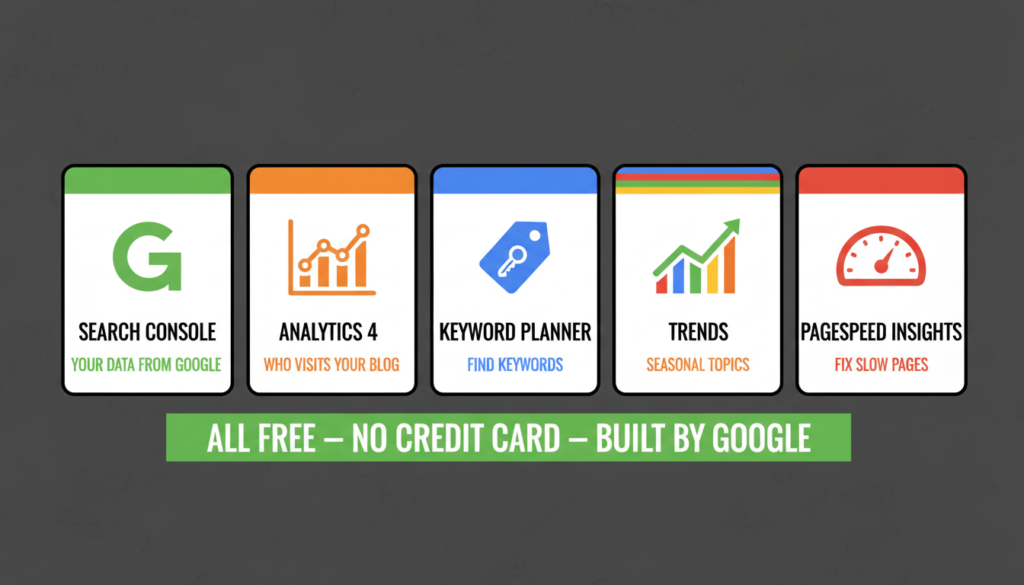
If you install only one tool from this entire list, make it Google Search Console. Everything else is supplementary. This is the only source of real Google data — not estimates, not projections, not third-party approximations. Actual data from Google about how your blog performs in their search results.
Set up your account at Google Search Console — it takes 15 minutes and gives you real Google data immediately.
What it shows you:
- Which keywords bring people to your blog (Queries report)
- Which pages get the most impressions and clicks (Pages report)
- Indexing errors — pages Google can’t access or hasn’t indexed
- Mobile usability issues affecting your rankings
- Core Web Vitals scores (loading speed, interactivity, layout stability)
How bloggers should use it: Check weekly. Start with the Queries report — it shows every keyword your blog appears for in search results, your average position, and click-through rate. Sort by impressions to find keywords you’re appearing for but not clicking on. Those are content improvement opportunities.
Indian blogger tip: Filter by country (set to India) in the Queries report. Your global rankings may differ significantly from how you perform for Indian users. If your audience is Indian, you want India-specific data.
What it can’t do: GSC only covers your own site. You can’t see competitor data, keyword difficulty scores, or backlink quality. It has no way to tell you whether a keyword is worth targeting before you’ve published content for it.
GSC is the most important free SEO tool for bloggers at any experience level.
2. Google Analytics 4: Free SEO Tool for Bloggers
Google Search Console tells you how you perform in search. Google Analytics 4 tells you what happens after someone clicks and arrives on your blog.
What it shows you:
- Traffic sources (how much comes from search vs social vs direct)
- Which blog posts get the most engagement
- Session duration and bounce rate per page
- Demographics — age, location, devices of your readers
- Conversion tracking if you have goals set up
How bloggers should use it: The Traffic Acquisition report is your starting point — it shows where your visitors come from. If 80% of your traffic is organic search, your SEO focus is working. If it’s mostly social, you have a search dependency gap to address.
The Engagement report shows which posts keep people reading. High traffic but low engagement time usually means the content isn’t delivering on its promise or isn’t matching the search intent that brought people there.
What it can’t do: GA4 has a steep learning curve — the interface was redesigned significantly and many bloggers find it disorienting at first. Start with Traffic Acquisition and Engagement reports. Ignore everything else for the first month.
GA4 and GSC together form the core free SEO tools for bloggers starting out.
3. Google Keyword Planner: Free SEO Tool for Bloggers
The primary free keyword research tool available to anyone. You need a Google Ads account to access it (create one at ads.google.com), but you don’t need to run ads or enter payment information to use the keyword research features.
What it shows you:
- Keyword ideas from any seed topic
- Search volume ranges (not exact numbers)
- Competition level — note: this refers to ad competition, not SEO competition
- Estimated CPC for advertisers
How bloggers should use it: Enter a topic or seed keyword, select India as your location, and review the suggestions. Export the full list to a spreadsheet. Look for keywords with medium to high search volume range and low competition — these are often worth investigating further.
Hindi tip: Try entering seed keywords in Hindi to find local-language search opportunities. “ब्लॉग कैसे शुरू करें” (how to start a blog) shows a completely different keyword set from the English version. Most English-focused guides miss this entirely.
What it can’t do: The volume ranges (100–1K, 1K–10K, 10K–100K) are frustratingly imprecise. You can’t tell if a keyword gets 200 searches or 900 searches from the same range. There’s also no keyword difficulty score — you can’t tell whether a keyword is easy or hard to rank for without checking manually.
Keyword Planner is the best free SEO tool for bloggers doing keyword research on zero budget.
4. Google Trends: Free SEO Tool for Bloggers
Underused by most bloggers, and particularly useful for Indian content creators who need to time content around events and seasons that matter to their audience.
What it shows you:
- Search interest over time for any topic (0–100 relative scale)
- Regional interest breakdown by Indian state
- Related topics and rising queries
- Comparisons between multiple keywords
How bloggers should use it: Enter your topic, set location to India, and look at two things: the trend direction (growing or declining?) and the “Rising” queries in the related section. Rising queries have growing search interest with potentially lower competition because fewer people have written about them yet.
Seasonal content planning: Indian blogging has distinct seasonal patterns. Diwali content spikes in October. IPL content peaks March–May. Tax filing queries surge June–July. Budget-related content spikes January–February. Google Trends shows you exactly when to publish seasonal content so you catch the wave rather than chase it.
What it can’t do: Trends gives relative interest (0–100), not actual search volume numbers. Use it alongside Google Keyword Planner — Trends shows direction, Planner shows approximate scale.
5. PageSpeed Insights: Free SEO Tool for Bloggers
Page speed is a confirmed Google ranking factor, and it affects Indian readers more than most bloggers account for. A large percentage of Indian blog readers use mobile devices on 4G connections where even a 2–3 second difference in load time changes whether someone stays or leaves.
What it shows you:
- Performance score (0–100) for mobile and desktop separately
- Core Web Vitals: LCP (main content load time), INP (responsiveness), CLS (layout stability)
- Specific items causing slowness with explanations
- Improvement opportunities with estimated time savings
How bloggers should use it: Test your blog URL and your most important posts. Check mobile score first — it’s almost always lower than desktop and matters more for Indian traffic. Focus on items marked red or orange.
Common blog speed killers: uncompressed images (biggest offender), too many plugins, unoptimised fonts, and render-blocking JavaScript.
Practical fix: Run every image through Squoosh (free, browser-based) before uploading. Converting JPEG to WebP typically reduces file size by 25–35% with no visible quality loss.
What it can’t do: PageSpeed Insights tells you what to fix but not always how. Technical fixes like server configuration, CDN setup, and JavaScript optimisation may require developer help.
6. Rank Math free (WordPress only)
If your blog runs on WordPress, Rank Math is the most powerful free on-page SEO plugin available. The free version includes features that Yoast charges for at premium tier.
What it does for each post:
- Scores your post’s SEO optimisation from 0–100
- Checks keyword usage in title, headings, URL, and content
- Verifies meta description length and keyword inclusion
- Counts internal and external links
- Generates XML sitemaps automatically
- Adds schema markup (review, FAQ, article schema)
- Checks readability and content length
How bloggers should use it: Before publishing any post, check the Rank Math sidebar. Set your focus keyword. Work through the checklist until you hit 80+. The highest-impact items: keyword in title, keyword in meta description, content above 600 words, and at least one internal link.
Why Rank Math over Yoast: Rank Math’s free version allows multiple focus keywords per post, includes advanced schema options, has a built-in redirect manager, and integrates with Google Search Console. Yoast charges for all of these.
What it can’t do: WordPress only. If your blog runs on Blogger, Wix, Squarespace, or any other platform, use their built-in SEO settings. Rank Math also focuses on on-page signals — it doesn’t help with keyword research, backlinks, or competitor analysis.
Rank Math is the essential free SEO tool for bloggers running WordPress sites.
7. Ubersuggest: Free SEO Tool for Bloggers
Ubersuggest is the only genuinely free SEO tool that shows keyword difficulty scores. KD is what tells you whether you can actually rank for a keyword — not just whether people search for it.
What it shows you (free tier):
- Search volume, keyword difficulty (0–100), CPC
- Related keyword suggestions
- Basic competitor analysis
- Domain overview for any site
How bloggers should use it: Use your 3 daily searches strategically. Before writing any post, check the KD score for your target keyword. KD above 50 is likely too competitive for a new blog. Target under 30 for new blogs, under 40 for blogs with some authority.
Workflow tip: Do initial keyword brainstorming in Google Keyword Planner (unlimited), then use your 3 Ubersuggest searches to validate KD scores for your top candidates before deciding what to write.
What it can’t do: 3 searches per day is genuinely restrictive for active keyword research. Data quality is also lower than Ahrefs or Semrush. Treat it as a directional signal, not a precise measurement.
Ubersuggest gives free SEO tools for bloggers access to keyword difficulty data
8. Screaming Frog: Free SEO Tool for Bloggers
Most bloggers never look at technical SEO. That’s a significant missed opportunity — technical issues like broken links, missing meta descriptions, and redirect chains quietly suppress rankings without any obvious symptom other than underperformance.
What it finds (free version, up to 500 URLs):
- Broken internal and external links (404 errors)
- Missing or duplicate title tags and meta descriptions
- Images without alt text
- Redirect chains (A → B → C — slow and messy)
- Duplicate page content
- Pages blocked by robots.txt
How bloggers should use it: Download the desktop application (screamingfrog.co.uk). Enter your blog URL and run a crawl. After it completes, go to the Response Codes tab and filter for 4XX errors — those are your broken links. Then check the Page Titles and Meta Description tabs for anything flagged as “Missing” or “Duplicate.”
Broken links and missing meta descriptions are quick fixes with direct SEO impact. Do those first.
What it can’t do: The 500 URL limit is fine for most bloggers with under 500 posts. Once you grow past that, you need the paid version ($259/year) or Semrush Site Audit through a group buy platform.
Screaming Frog rounds out the free SEO tools for bloggers technical audit stack.
9. Keyword Surfer: Free SEO Tool for Bloggers
Keyword Surfer adds search volume and related keyword data directly to Google’s search results. No separate tool to open, no extra tabs — the data appears as you search normally.
What it adds to Google results:
- Monthly search volume for your query
- CPC estimate
- A sidebar with related keyword suggestions and their volumes
- Content metrics for pages ranking in results
How bloggers should use it: Install the extension and let it run passively. Every time you search Google for research, topic ideas, or general browsing, you’ll see search volumes inline. When something in your niche shows 1,000+ monthly searches, you know immediately whether a topic is worth writing about — no extra tabs, no separate tool.
What it can’t do: Volume estimates from Keyword Surfer are rough approximations — less accurate than Ahrefs or Semrush. No keyword difficulty data. Use it for quick directional checks and idea generation, not for final keyword validation on important posts.
10. GFXToolz Free Tier: Free SEO Tool for Bloggers

This one is different from the other nine. GFXToolz offers a permanent free tier — not a trial — that gives you limited access to their tool library including some SEO tools, design tools, and basic AI features.
What the free tier gives you: Access to a selection of tools from the GFXToolz library, 1 device, and a look at the complete dashboard before committing to a paid plan. No credit card required.
Why it’s on this list: It’s the only group buy platform with a permanent free tier. If you’ve been reading about Ahrefs and Semrush and wondering whether group buy access fits your workflow, GFXToolz Free lets you test the concept with zero financial risk. See how the Chrome extension works, explore what’s available, understand what ₹423/month would get you — before spending anything.
When to upgrade: When the other nine tools on this list hit their limits and you need backlink analysis, competitor keyword research, exact search volumes, or AI image generation. GFXToolz Basic at ₹423/month adds Ahrefs, Semrush, Moz, Canva Pro, Grammarly, and 100+ tools.
Free SEO Tools for Bloggers: Complete Workflow
Here is how to combine all these free SEO tools for bloggers into one working system.
Tools are only useful when you know how to combine them. Here’s a 6-step workflow using the free stack above, start to finish for any new blog post.
Step 1: find a topic. Open Google Trends, set location to India, and browse the “Rising” queries in your niche. Cross-reference with Google Keyword Planner to estimate search volume.
Step 2: validate the keyword. Use one of your 3 daily Ubersuggest searches to check Keyword Difficulty. Aim for KD under 30 for new blogs. Check Keyword Surfer while Googling competitors to see volume inline.
Step 3: write and optimise. Open your WordPress draft. Set the focus keyword in Rank Math. Write your post. Work through the Rank Math checklist before publishing — aim for 80+.
Step 4: check technical health. Run Screaming Frog on your blog monthly to catch broken links and missing metas. After publishing each post, run it through PageSpeed Insights to catch speed issues before they affect rankings.
Step 5: track results. After 2–4 weeks, check Google Search Console for your new post. Look at which queries it appears for and its average position. Check GA4 to see how long readers stay.
Step 6: improve striking distance keywords. In Google Search Console, filter the Queries report for positions 8–20. These are pages almost on page one. A targeted improvement — better title, stronger intro, more comprehensive content — can push them into the top 5. Most bloggers skip this step entirely and chase new posts instead. Don’t.
Repeat this for every post. The gains accumulate slowly, then noticeably.
What Free SEO Tools for Bloggers Cannot Do
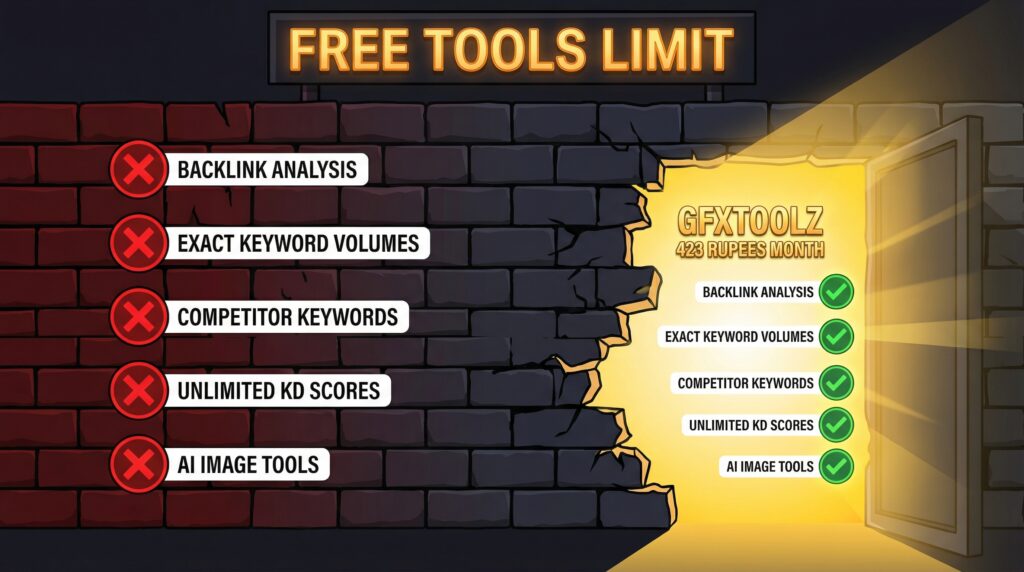
Understanding the ceiling of free SEO tools for bloggers helps you plan when to upgrade
Honest about the gaps in the free stack:
Backlinks are invisible. You can’t see who links to you beyond GSC’s basic data, who links to competitors, or which links you should be building. Backlink analysis requires Ahrefs, Semrush, or Moz.
Keyword volumes are imprecise. Google Keyword Planner shows ranges. Ubersuggest shows rough approximations. Exact monthly volumes require paid tools.
Competitors are opaque. You can’t see which keywords your competitors rank for, what their traffic looks like, or what content is driving their growth. These are core capabilities of Ahrefs and Semrush.
Keyword difficulty data runs out fast. Ubersuggest’s 3 searches per day is a real constraint for any active content strategy.
AI tools don’t exist in the free stack. Creating AI-powered blog thumbnails, social graphics, or AI-assisted content requires paid tools.
When to upgrade: when you have 50+ posts published and need competitive intelligence to grow further, when you’re earning income from your blog and ₹423/month is a realistic reinvestment, or when you’re spending more time working around free tool limits than a basic subscription would cost you.
Free tools vs GFXToolz Basic (₹423/month)
| Capability | Free tools | GFXToolz Basic |
|---|---|---|
| Keyword search volume | Ranges only | Exact numbers (Ahrefs + Semrush) |
| Keyword difficulty | 3/day (Ubersuggest) | Unlimited |
| Backlink analysis | None | Full (Ahrefs + Semrush + Moz) |
| Competitor keyword research | None | Full |
| Content optimisation | Rank Math on-page only | Grammarly + AI tools |
| Design tools | None | Canva Pro + Envato Elements |
| AI image generation | None | 10/day (Nano Banana Pro, Flux 2) |
| Technical audit | 500 URLs (Screaming Frog) | Unlimited (Semrush Site Audit) |
| Monthly cost | ₹0 | ₹423 |
The 10 free tools above cover roughly 60–70% of what a beginner blogger needs. GFXToolz Basic fills the remaining 30–40% for around the cost of a meal delivery order per month.
FAQ
What are the best free SEO tools for beginners in 2026? The non-negotiable ones: Google Search Console (keyword and performance tracking), Google Keyword Planner (keyword ideas), Google Trends (trending topics), Rank Math free (on-page optimisation for WordPress), Ubersuggest free (keyword difficulty, 3 searches/day), Keyword Surfer extension (volumes in browser), and Screaming Frog free (technical crawl, 500 URLs). These seven cover the core workflow at zero cost.The best free SEO tools for bloggers in 2026 start with Google Search Console
Can I do SEO without paying for any tools? Yes. Google Search Console, Keyword Planner, Trends, PageSpeed Insights, Rank Math, and Keyword Surfer cover everything a beginner blogger needs for the first 1–3 months. The main gaps are backlink analysis and competitor keyword research — capabilities that matter once you’re publishing consistently and want to grow competitively.
What can free SEO tools not do? Exact keyword search volumes, unlimited keyword difficulty scoring, competitor backlink analysis, competitor keyword intelligence, and AI content and image generation. For these, you need Ahrefs, Semrush, or equivalent — accessible in India through group buy platforms like GFXToolz from ₹423/month.
Is Google Search Console enough for SEO? It’s the single most important tool and should be the first thing you set up. It provides real data directly from Google, not estimates. But it only covers your own site. For competitor research, keyword difficulty, and backlink analysis, you need additional tools. Start with GSC and build from there.
When should I upgrade from free to paid SEO tools? When you have 50+ published posts and need competitive analysis to grow further. When you’re earning from your blog and ₹423–₹846/month is a realistic reinvestment. When the 3-search Ubersuggest cap is slowing your keyword research. When you need backlink data and competitor intelligence for a more intentional content approach.
What’s the cheapest way to get premium SEO tools in India? Group buy platforms offer premium access at 90–97% discounts. GFXToolz starts with a permanent free tier (₹0, no credit card) and Basic at ₹423/month for 100+ tools including Ahrefs, Semrush, Canva Pro, and AI generation. NoxTools (₹249/month) and Toolzbuy (₹269/month) are lower-budget options. All three accept UPI and Indian card payments.
Free SEO Tools for Bloggers: The Bottom Line
Google Search Console and Keyword Planner are non-negotiable starting points. Rank Math makes every WordPress post better before you publish. The rest fill specific gaps as you need them.
Use the 6-step workflow above for your first 1–3 months with nothing but free tools. When you’re ready for competitor data, exact keyword volumes, backlink analysis, and AI-powered content creation, GFXToolz’s free tier lets you test premium access at ₹0 before upgrading.
These 10 free SEO tools for bloggers cover everything you need for your first 1 to 3 months.
Set up Google Search Console today if you haven’t already. That single task — 15 minutes, free, permanent — gives you more useful data than most paid tools can offer about your own site.
Start free at gfxtoolz.ai.
Also read:
- Best Affordable SEO Tools Under ₹500/Month in India
- How to Do Keyword Research in 2026: Complete Beginner Guide
- Why Indian Freelancers Are Switching to GFXToolz in 2026
Leave a Comment