


Published by GFXToolz AI | Last updated: March 2026
This ecommerce SEO guide covers every step you need to rank your online store on Google in 2026 — from keyword research and product page optimization to technical fixes, internal linking, and link building.
Your online store has 200 products. You spent three months building it on Shopify or WooCommerce. You launched it, shared it on Instagram, and maybe even ran some Meta ads. Traffic came for a few days… then disappeared.
Meanwhile, a competitor selling similar products is ranking on page 1 for multiple high-intent keywords and getting thousands of monthly visitors without spending heavily on ads.
That’s not luck — that’s SEO.
And in ecommerce SEO India 2026, organic visibility is becoming one of the biggest growth channels for Indian brands. While many store owners focus only on ads, influencers, and social media, they often ignore the one channel that can keep bringing traffic even when ad spend stops: search.
If you’re wondering how to rank online store 2026, this guide breaks it down in a practical, easy-to-follow format. Whether you run a fashion brand, electronics store, home décor shop, or niche product website, the fundamentals remain the same.
This online store SEO guide India is designed specifically for store owners, freelancers, and marketers who want to build long-term organic traffic instead of relying only on paid campaigns. It also works as an ecommerce SEO tutorial 2026 for beginners who want a step-by-step understanding of what actually helps product and category pages rank.
Inside this guide, you’ll learn how to structure your store properly, target the right keywords, optimize your product pages, fix technical SEO issues, and build authority — all with realistic tools and time investment for each step.
If your goal is to rank without depending entirely on ads, this is the ecommerce SEO guide you need.
Ecommerce SEO Guide: Why It Beats Ads in 2026
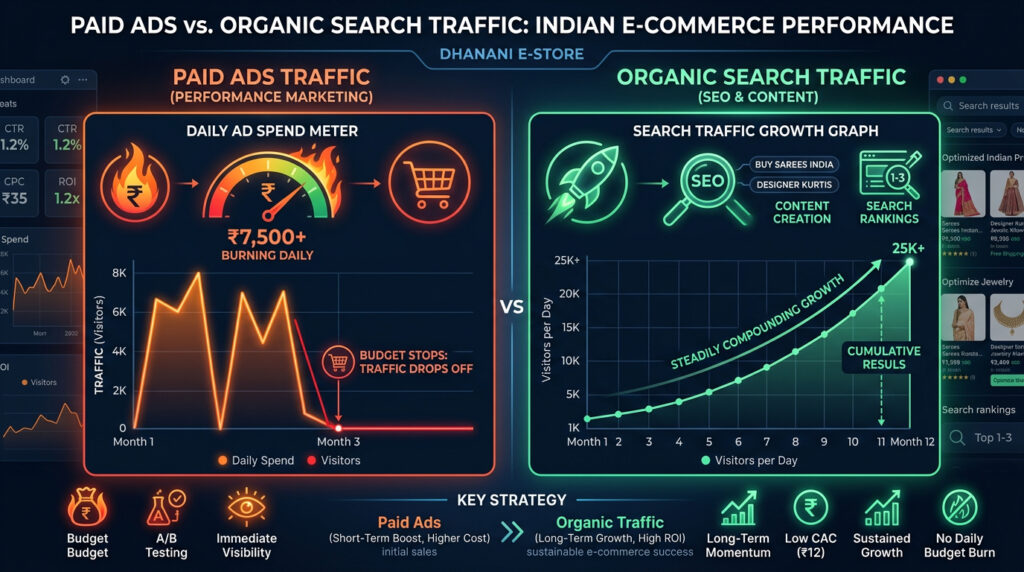
23% of e-commerce orders in India come from organic search. Paid ads account for a similar share but cost money every single day. Organic traffic compounds — a product page that ranks today keeps bringing visitors for months or years. An ad stops the moment you pause the budget.
The math for a mid-size store: 50 product pages ranking on page 1 for their target keywords, each getting 200 visits per month, equals 10,000 monthly visitors at ₹0 in ongoing ad spend. Building that through Google Ads at ₹10 per click would cost ₹1,00,000 per month — and disappears the day you stop paying.
AI search changed something in 2026. Google AI Overviews, ChatGPT Shopping integrations, and Perplexity product recommendations are increasingly how people discover products. Stores with proper schema markup and well-structured product content get cited in AI-generated answers. Stores without it get skipped. Technical optimisation is no longer optional.
For keyword research foundations, see the Keyword Research Tutorial 2026 in this series.
Ecommerce SEO Guide: Keyword Research for Products
The biggest mistake in product keyword research: targeting keywords you think buyers use instead of keywords buyers actually type.
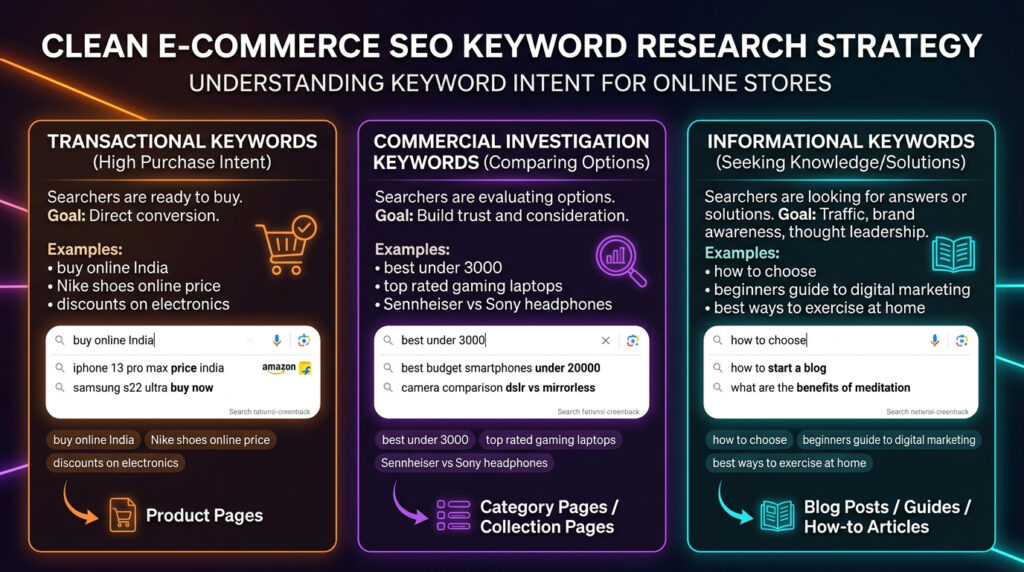
Three types of e-commerce keywords
Transactional keywords (buy intent): “buy running shoes online India,” “order organic honey Delhi,” “cotton kurta for men under 1000.” These go on product pages. Searchers using these terms are ready to purchase.
Commercial investigation: “best running shoes under 3000,” “organic honey vs regular honey,” “which running shoe brand is best in India.” These go on category pages or comparison blog posts. Searchers are evaluating options before buying.
Informational: “how to choose running shoes for flat feet,” “benefits of organic honey,” “how to style a cotton kurta.” These go on blog posts that link to product pages. Not yet buying, but entering the funnel.
Keyword research is the foundation of any good ecommerce SEO guide
Step-by-step keyword research
Step 1: product names + buyer modifiers. Take each product name and add: “buy online India,” “price,” “online,” “best,” “under [price point].” “Blue cotton t-shirt” becomes: “buy blue cotton t-shirt online India,” “blue cotton t-shirt price,” “best blue cotton t-shirt India.”
Step 2: Semrush Keyword Magic Tool. Enter your modified keywords. Filter for India. Look at volume (how many searches), keyword difficulty (can you rank?), and CPC — advertisers pay more per click on keywords where the searcher is closer to buying, so high CPC is a useful proxy for purchase intent. Export everything with KD under 40 and volume above 100. Both Semrush and Ahrefs are accessible through GFXToolz at ₹423/month.
Step 3: mine Amazon and Flipkart autocomplete. Type your product category in Amazon or Flipkart’s search bar. Every suggestion is how real Indian buyers type their product searches. These are more valuable than any keyword tool because they come from actual purchase-intent searches on India’s biggest marketplaces. Copy them all.
Step 4: find content gaps using Ahrefs. Enter 3–5 competitor store domains in Ahrefs Content Gap tool. It shows every keyword they rank for that you don’t — organic traffic they’re capturing that you aren’t. Full guide in the Content Gap Analysis post in this series.
Step 5: map keywords to pages. Every keyword needs an assigned page. Transactional keywords to product pages. Commercial investigation keywords to category pages or comparison content. Informational keywords to blog posts. No two pages should target the same keyword — that’s cannibalization.
Ecommerce SEO Guide: Site Architecture
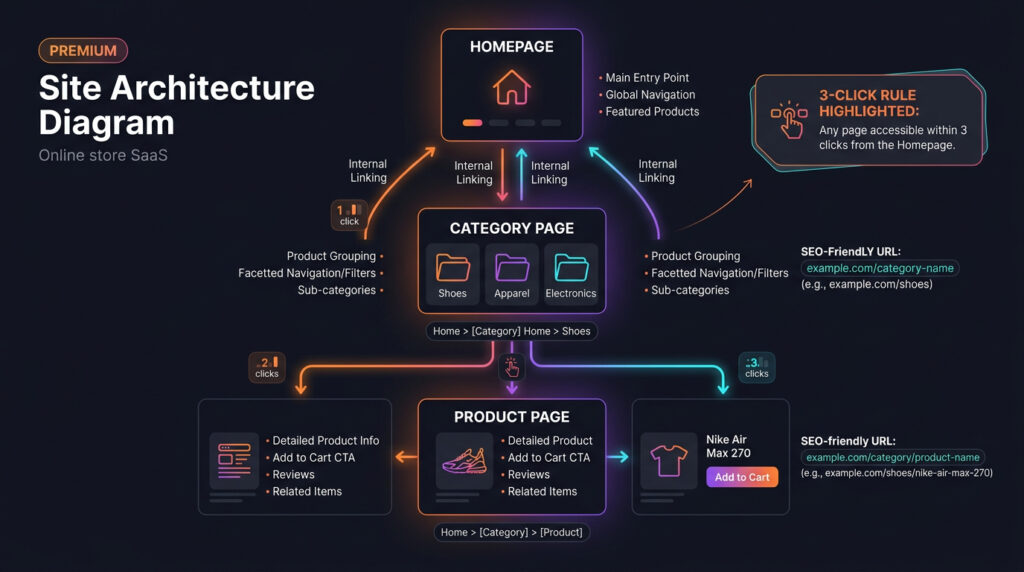
Site architecture is how your store is organised. Google needs to crawl every product efficiently. Buyers need to find products without confusion. It turns out these requirements lead to the same answer: a clean, logical hierarchy.
The 3-click rule
Every product should be reachable within 3 clicks from the homepage: Homepage → Category Page → Product Page. If a product requires 4–6 clicks, Google de-prioritises crawling it and buyers give up before finding it.
Recommended URL structure:
yourstore.com/
yourstore.com/men/
yourstore.com/men/t-shirts/
yourstore.com/men/t-shirts/blue-cotton-t-shirt/
Keep URLs clean and descriptive. yourstore.com/men/cotton-t-shirts/blue-round-neck-tshirt beats yourstore.com/product?id=38472&variant=blue on both readability and SEO. Every word in your URL signals to Google what the page covers.
Breadcrumb navigation: Add breadcrumbs on every category and product page. They help buyers understand where they are, reduce bounce rate, and appear in Google search results as a navigational element. Rank Math generates breadcrumb schema for WooCommerce automatically.
Internal linking rules:
- Every product page links to its parent category
- Every category page links to its top 5 best-selling products
- Blog posts link to 2–3 relevant product or category pages
- Related product sections at the bottom of each product page
Faceted navigation: Most stores have filters — size, colour, price range. Each filter combination generates a unique URL. Without proper handling, you end up with thousands of near-duplicate pages diluting crawl budget and confusing Google. Use canonical tags pointing filter variations back to the main category URL. Use noindex on internal search result pages.
Sitemaps: Create an XML sitemap listing all product and category pages. Submit it in Google Search Console. Rank Math and Yoast both generate and maintain sitemaps for WordPress/WooCommerce automatically.
Site structure is what most ecommerce SEO guide articles skip entirely
Product page SEO: the highest-impact pages in your store
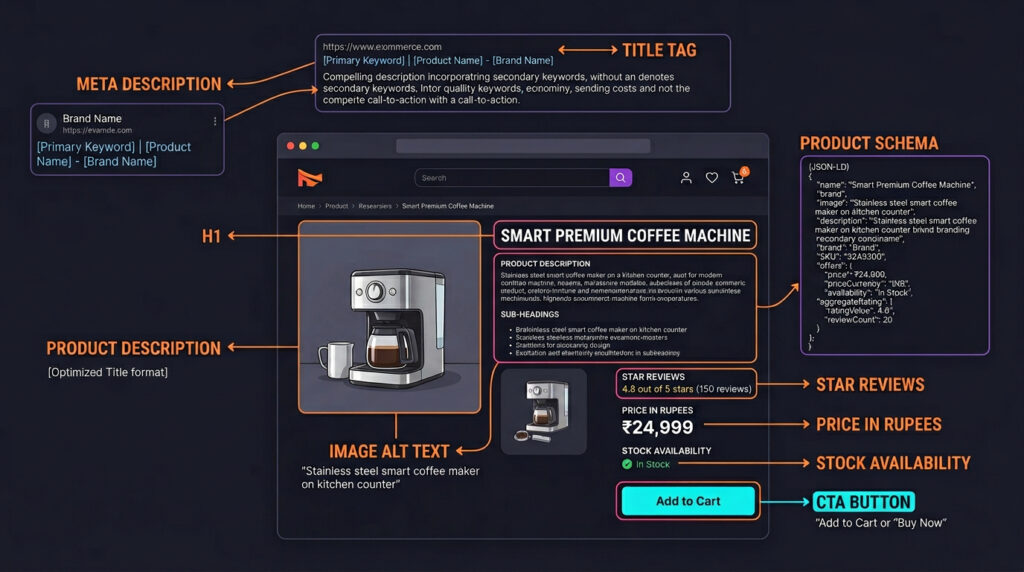
Product pages are where sales happen. Optimising them produces the fastest, most direct results.
Product page SEO checklist
Title tag: [Product Name] + [Key Feature] + [Buy Online India] — under 60 characters. “Blue Cotton T-Shirt for Men | Buy Online India” works. “Blue Cotton Round Neck T-Shirt Pure Cotton Comfortable Men XL L M S India Buy” does not.
Meta description: Lead with the product benefit, include price or offer if competitive, end with a CTA. 150–160 characters. Example: “Pure cotton round-neck t-shirt for men. ₹349 free delivery. Available in 5 colours. Order now.”
H1: Product name with primary keyword. One H1 per page, close to matching the title tag.
Product description: Minimum 300 words for competitive products. Not just specs — include who it’s for, what problem it solves, how to use it, and what makes it different. Weave long-tail keyword variations naturally. Google can’t rank a thin description against competitors who have comprehensive product content.
Images: Name files descriptively before uploading: blue-cotton-t-shirt-men-front.jpg beats IMG_3847.jpg. Add alt text with contextual keyword usage. Use WebP format to reduce file size without quality loss.
AI-generated product images: GFXToolz AI Studio creates a genuine edge here. Use Nano Banana Pro or Flux 2 to create lifestyle shots, size comparison guides, and product infographics that don’t exist on competitor sites or manufacturer pages. Google values unique content — images sourced exclusively from a manufacturer’s product sheet appear on dozens of stores. Yours won’t. Premium plan at ₹846/month includes 50 AI image generations per day.
Product schema markup: Add Product schema with price, availability, brand, SKU, and review rating. This enables rich snippets in Google results — star ratings, price, availability displayed directly in the search result — which increases click-through rate. Rank Math handles Product schema for WooCommerce automatically.
Customer reviews: Enable reviews on every product page. Each review adds unique user-generated content that includes natural language variations of your target keywords. A product with 50 reviews has significantly more unique content than one with none, and Google weights it accordingly.
For content optimisation of product descriptions, see the Surfer SEO Tutorial in this series.
Product pages are where this ecommerce SEO guide has the most direct impact
Category page SEO: the most underoptimised pages in e-commerce
Category pages often have the potential to rank for the highest-volume commercial keywords in any niche — “men’s running shoes India,” “organic skincare products,” “home decor items online.” Most store owners leave them as bare product grids with zero text.
Category page optimisation
Add 200–500 words of text. Place a description above or below the product grid explaining what the category offers, who it’s for, what makes your selection different, and what buyers should consider when choosing. This is where you naturally use the category’s primary and secondary keywords.
H1 with keyword. “Men’s Running Shoes — Buy Online India” beats “Running Shoes.” Every category page deserves a keyword-optimised H1.
FAQ section. Add 3–5 questions targeting long-tail variations of the category keyword. “What’s the best running shoe for flat feet?” “Which running shoe is best for daily use?” These target informational queries and can appear in Google’s People Also Ask boxes.
Category-level schema. Add CollectionPage or ItemList schema. This helps Google understand the page structure and can enable enhanced search appearances.
Internal linking from category pages. Link to your 3–5 best-selling products prominently. Link to 1–2 relevant blog posts from the category description.
Thin category pages. If a category has fewer than 5 products, consider merging it with a related one. A 2-product “Accessories” category produces a weak SEO signal and a poor buying experience.
Category pages are the most underused opportunity in any ecommerce SEO guide
Technical SEO for e-commerce stores
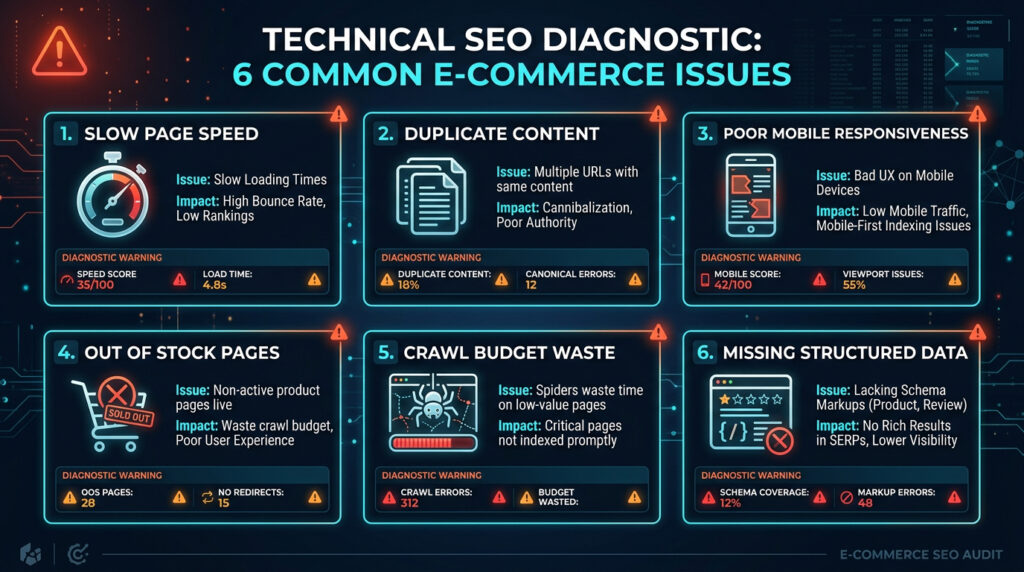
Technical issues quietly suppress rankings for most online stores. The fastest SEO improvements are often technical, not content-related.
| Issue | Why it matters | How to fix |
|---|---|---|
| Page speed / Core Web Vitals | Slow pages lose rankings and customers. LCP must be under 2.5 seconds. | Compress images to WebP, lazy-load below-fold content, minimise JavaScript, use a CDN |
| Duplicate content | Product variants (colour/size) and filter pages create near-identical URLs | Use canonical tags on variant URLs pointing to the main product URL. Noindex filter/sort pages. |
| Mobile responsiveness | Google uses mobile-first indexing. Non-mobile-friendly stores don’t rank well. | Test with Google Mobile-Friendly Test. Fix button sizes, font sizes, tap targets. |
| Out-of-stock pages | Deleting products loses their SEO value (backlinks, rankings). | Keep the page live, show “out of stock,” suggest alternatives. If permanently discontinued, 301 redirect to category. |
| Crawl budget waste | Large stores waste Google’s crawl budget on cart, checkout, and search result pages | Block non-essential pages in robots.txt. Use noindex on cart, checkout, and internal search pages. |
| HTTPS / Security | Non-HTTPS stores show “Not Secure” in browsers. Buyers abandon insecure checkouts. | Ensure SSL certificate is active, including on product images and third-party scripts. |
| Structured data | Product schema enables rich snippets in results, improving CTR | Add Product schema via Rank Math (WooCommerce) or Shopify SEO apps. Test with Rich Results Test. |
Run a full technical audit: Semrush Site Audit via GFXToolz scans your entire store for all of these in one go, producing a prioritised list with severity ratings and fix instructions. For the complete audit process, see the SEO Audit Tutorial in this series.
Technical fixes are the fastest wins in this ecommerce SEO guide
Link building strategies that work for Indian stores
Product and category pages need backlinks to compete for high-volume commercial keywords.
Supplier and manufacturer links. Every product you stock has a manufacturer or distributor. Many have “where to buy” or “official dealers” pages. Reach out and ask to be listed. These links are easy to get and directly relevant to your products.
Product review outreach. Send free products to bloggers and YouTubers in your niche. A genuine product review from a niche blogger with 5,000 readers is worth significantly more than a listing in a generic directory. Target reviewers whose audience matches your buyer.
Buying guides and comparison content. Create “10 best [product category] under ₹2,000 in India” posts. These rank for commercial investigation keywords and earn backlinks from other sites referencing your content. Other bloggers link to useful buying guides — it’s one of the more reliable organic link acquisition strategies in e-commerce.
Indian business directories. JustDial, IndiaMART, Google Business Profile (if you have a physical location), and niche-specific directories for your product category. Lower authority but builds a natural local link profile.
Broken link building. Use Ahrefs Site Explorer (via GFXToolz) to find broken external links on competitor sites or niche blogs. If a broken link pointed to a product page or category similar to yours, offer your URL as a replacement. A useful existing page makes this pitch straightforward.
For the full backlink strategy and analysis, see the Complete Guide to Backlink Analysis in this series.
Link building completes the full ecommerce SEO guide process.
The 30-day action plan
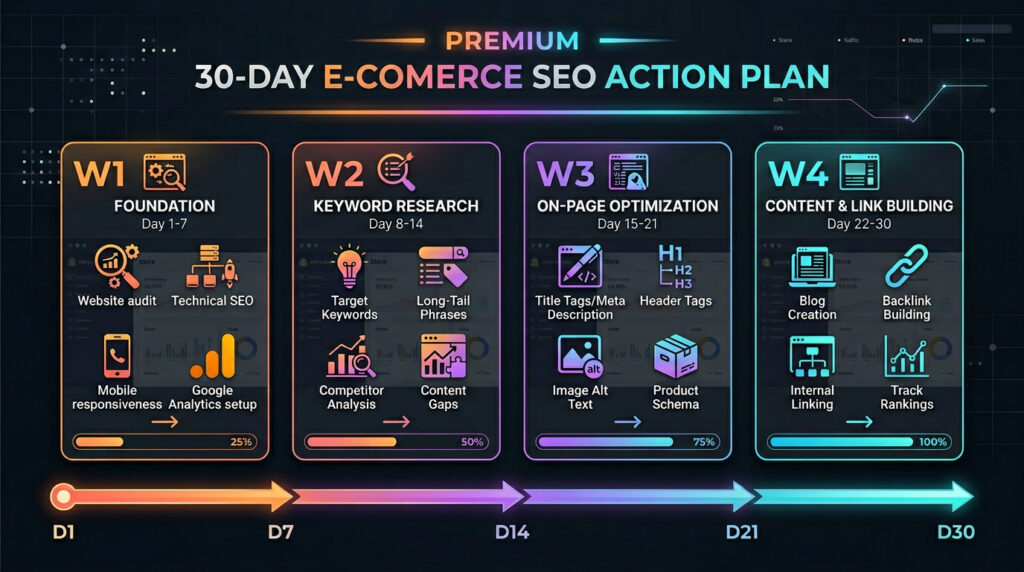
| Week | Focus | Key tasks | Tools |
|---|---|---|---|
| Week 1 | Foundation | Set up Google Search Console, run Semrush site audit, fix critical errors (broken links, missing meta, speed issues), submit XML sitemap | GSC (free) + Semrush via GFXToolz |
| Week 2 | Keyword research | Research and map keywords for top 20 products and top 5 category pages, identify competitor content gaps | Semrush + Ahrefs via GFXToolz |
| Week 3 | On-page optimisation | Optimise title tags, meta descriptions, H1s, image alt text, and descriptions for all 25 mapped pages. Add Product schema. | Rank Math + Semrush Writing Assistant via GFXToolz |
| Week 4 | Content and links | Publish 2 buying guides targeting commercial investigation keywords, enable product reviews, start supplier and blogger outreach | Canva Pro via GFXToolz + Ahrefs |
After 30 days: set up weekly rank tracking in Semrush Position Tracking via GFXToolz. Continue optimising 5 product pages per week. Publish 2 buying guides per month. The How to Track Keyword Rankings post covers the weekly routine.
This 30-day plan is the execution roadmap for this ecommerce SEO guide
Tools and what they cost
| Tool | What it does for e-commerce | Direct price | Via GFXToolz |
|---|---|---|---|
| Semrush | Keyword research, site audit, competitor analysis, rank tracking | ₹11,600/month | Included — Basic ₹423/mo |
| Ahrefs | Backlink analysis, content gap, keyword explorer | ₹8,900/month | Included — Basic ₹423/mo |
| Surfer SEO | Product description optimisation, content scoring | ₹7,400/month | Included — Basic ₹423/mo |
| Rank Math Pro | On-page SEO, schema markup, sitemaps (WooCommerce) | ₹4,900/year | Purchase separately |
| Canva Pro | Product banners, social graphics, store visuals | ₹4,000/year | Included — Premium ₹846/mo |
| Nano Banana / Flux 2 | AI product images, lifestyle shots | Not available standalone | Included — Premium ₹846/mo |
These are all the tools referenced in this ecommerce SEO guide
Total direct cost: ₹30,000+/month. Via GFXToolz Basic: ₹423/month. Via Premium (with AI image generation): ₹846/month.
FAQ
How long does e-commerce SEO take to show results?
Most Indian online stores see measurable ranking improvements within 3–6 months of consistent optimisation. Quick wins — product schema, title tag fixes, Core Web Vitals — can show impact within weeks. Competitive category keywords for established niches take 4–6 months. Start with technical fixes in Week 1 specifically because those are the fastest to move the needle. This ecommerce SEO guide shows results within 3 to 6 months of consistent work
Does this apply to Shopify stores?
Yes — this ecommerce SEO guide applies to Shopify and WooCommerce equally. Shopify has basic built-in SEO features. WooCommerce requires Rank Math or Yoast for complete schema and sitemap management.
Can I do e-commerce SEO without expensive tools?
You can start with Google Search Console (free) for technical monitoring and Rank Math for basic on-page work. But serious keyword research — accurate difficulty scores, competitor gap analysis, full site audits — requires Semrush or Ahrefs. GFXToolz Basic at ₹423/month gives you both, making professional e-commerce SEO accessible without the ₹20,000+/month direct cost. GFXToolz at ₹423/month covers all tools referenced in this ecommerce SEO guide
How many products should I optimise first?
Start with your top 20 by revenue or sales velocity. Optimise their titles, descriptions, images, and schema completely before touching lower-priority products. Then optimise your top 5 category pages. 25 pages optimised thoroughly outperforms 200 pages done halfway — and these 25 generate the most revenue anyway. Start with your top 20 products as recommended in this ecommerce SEO guide.
Do I need a blog for my online store?
Yes. Product pages can’t rank for informational keywords like “how to choose running shoes for flat feet” or “benefits of organic honey.” Blog posts capture that informational traffic and funnel it toward product pages. Publish a minimum of 2 buying guides per month targeting commercial investigation keywords in your niche.
Ecommerce SEO Guide: The Bottom Line
Most Indian online stores have zero Product schema, manufacturer copy for descriptions, and category pages with no text. That’s the benchmark you’re working against, and it’s a low one.
Get Product schema working with Rank Math this week. Rewrite the descriptions on your top 5 products — not the manufacturer copy, actual descriptions for the buyer who found you via search. Then work through the 30-day plan.
50 optimised product pages each getting 200 visits a month is 10,000 free monthly visitors. The same traffic through Google Ads at ₹10 per click would cost ₹1,00,000 a month and disappear the day you pause the campaign.
Follow this ecommerce SEO guide step by step and organic traffic compounds over time.
Access Semrush, Ahrefs, Surfer SEO, and Canva Pro via GFXToolz starting free at gfxtoolz.ai.
Also read:


Leave a Comment