



Published by GFXToolz AI | Last updated: March 2026
Surfer SEO tutorial — this is the complete guide to content optimization for 2026. You found the right keyword, wrote a good article, published it — and it’s sitting on page 3.
Usually the problem is content optimization. Your article doesn’t match what Google expects to see for that keyword — the structure is off, you’re missing key semantic terms, or you’re 500 words short of what’s currently ranking. Good writing isn’t enough on its own. Two equally well-written articles can rank very differently because one matches Google’s expectations for that query and the other doesn’t.
This guide explains how Surfer SEO addresses this problem, step by step — from setting up your first Content Editor query to hitting a 90+ Content Score. We’ll also cover how to access it affordably, because at $89–219/month retail, it’s out of reach for most Indian freelancers and bloggers.
This surfer seo tutorial covers the complete 5-step workflow from setup to ranking
What Surfer SEO does and why it matters
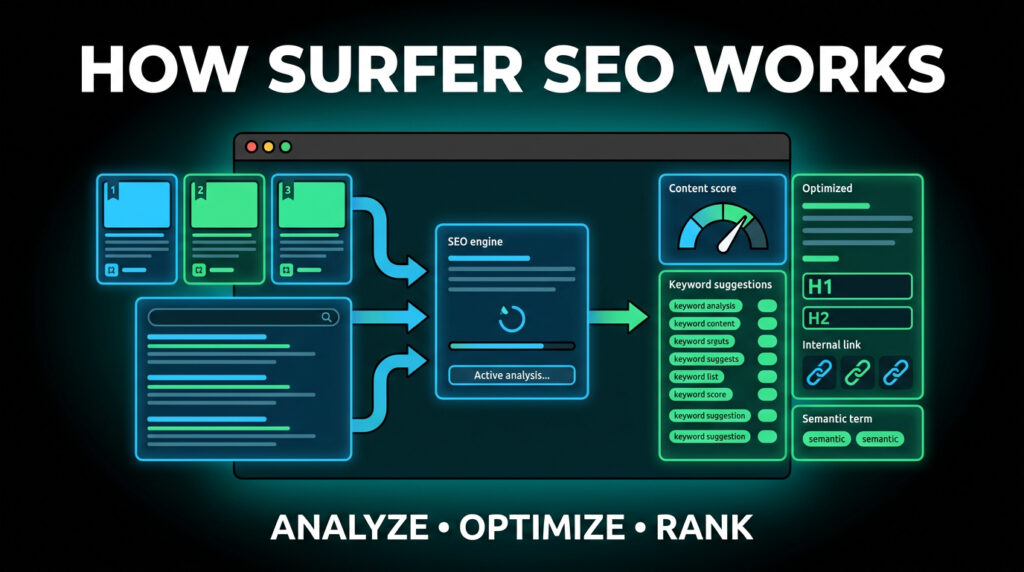
Surfer SEO is a content optimization tool. It analyses the top 10 pages currently ranking for your target keyword, examines 500+ factors across those pages — word count, keyword usage, heading structure, NLP terms, image count, internal links — and generates a blueprint showing what your content needs to compete.
The reasoning: Google doesn’t rank the “best” content by feel. It ranks content that consistently matches the signals it associates with satisfying a particular search query. Those signals are measurable. Surfer measures them.
The Content Score is Surfer’s primary metric — a 0–100 number measuring how optimised your content is against the current top-ranking pages. Articles scoring 67+ are roughly 4x more likely to rank in the top 10, according to Surfer’s internal data. A score of 80+ puts you in competitive range for the top 5 on most keywords.
Why this matters more in 2026: AI-generated content has flooded search results. Google is increasingly weighting signals that distinguish topically complete, genuinely useful content from surface-level output. Surfer’s NLP term suggestions help you build that topical depth — not just keyword frequency, but semantic coverage that signals to Google you actually understand the subject.
Pricing and how to access it affordably

| Plan | Monthly cost (USD) | Monthly cost (INR) | Articles/month |
|---|---|---|---|
| Essential | $89 | ₹7,400 | 30 |
| Scale | $129 | ₹10,750 | 100 |
| Scale AI | $219 | ₹18,200 | 100 (with AI) |
No free plan. A 7-day money-back guarantee applies to all plans.
For an Indian freelancer writing 5–10 blog posts per month, $89/month is a real investment — especially when Ahrefs (₹10,700) and Semrush (₹11,600) are also in the picture.
Group buy access: Surfer SEO is available through group buy providers. GFXToolz includes content optimization tools in its bundle from ₹423/month alongside Ahrefs, Semrush, Canva Pro, and 100+ other tools. That’s the complete content and SEO stack for less than 6% of buying each tool separately.
Free alternative worth knowing: Semrush’s SEO Writing Assistant is included in Semrush’s Pro plan, accessible through GFXToolz. It provides real-time content scoring and basic keyword recommendations as you write. Less deep than Surfer — the NLP analysis and term frequency suggestions are less detailed — but it covers the fundamentals and costs nothing extra if you already have Semrush access. Worth trying before paying for a dedicated Surfer subscription.
Affordable access is one of the most common questions in any surfer seo tutorial
The 5-step Surfer SEO workflow
Surfer SEO Tutorial Step 1: Create a Content Editor Query
Open Surfer SEO and go to Content Editor. This is the main workspace for new content.
Step 1 of this surfer seo tutorial starts inside the Content Editor dashboard
Setup:
- Enter your target keyword (e.g., “how to do keyword research for beginners”)
- Set your target country (India for Indian audiences)
- Set device preference — select mobile for Indian content, since 70%+ of Indian search traffic is mobile
- Enable NLP Analysis — essential for semantic term suggestions, not just exact keyword matches
- Click Create
Surfer analyses the top 10–20 ranking pages for your keyword and builds the optimization blueprint in 30–60 seconds.
What you see after the analysis:
- Recommended word count range (e.g., “write 2,400–3,100 words”) — the range of top-ranking content for this keyword
- Recommended heading, paragraph, and image counts
- Keyword suggestions with target frequency ranges (e.g., “keyword research” should appear 12–18 times, “search volume” 4–7 times)
- NLP terms: semantic concepts Google looks for in comprehensive coverage of this topic
This blueprint tells you what you’re working toward before you write a word. Building to the spec upfront is faster than discovering gaps in a finished draft.
Surfer SEO Tutorial Step 2: Build Your Outline
Don’t start writing immediately. Use Surfer’s data to plan your structure first.
The Outline Builder suggests H2 and H3 headings based on what top-ranking content covers. Review the heading suggestions in the Content Editor sidebar — they tell you the subtopics and questions Google expects comprehensive coverage on.
Keep headings that are directly relevant to your angle, skip ones that don’t fit, and add headings Surfer doesn’t suggest but you know add genuine value — your original perspective, current data competitors don’t have, or India-specific context if your audience is Indian.
Surfer tells you what competitors cover. Your job is to cover the same ground AND add something they don’t. Matching competitors gets you into the top 10. Adding something they missed is what moves you up within it.
AI Outline Builder (2026 feature): Surfer’s AI Outline generates headings alongside questions extracted from the SERP — PAA boxes, related searches. The questions section is particularly useful. Use them directly as your FAQ headings, since these exact questions already appear in Google’s results for your keyword.
Once headings are chosen, add placeholder sections under each in the editor. You now have a complete structure before writing a single paragraph. This prevents the most common problem: finishing a draft and discovering you missed three topics the top-ranking pages all cover.
Surfer SEO Tutorial Step 3: Write and Optimize in Real Time
The real-time scoring in this surfer seo tutorial step updates as you type.
As you write in the Content Editor, the Content Score in the top right updates live. The sidebar keyword list shifts colour:
- Green — used at sufficient frequency, leave it alone
- Yellow — present but needs to appear more
- Red — missing completely, needs to be added
The right workflow: write your first complete draft naturally, without watching the score. Focus on actually answering the search query well. Chasing the score while writing produces awkward, over-optimized text that readers notice immediately.
After the draft is done, open the side panel and work through yellow and red terms. For each missing term, ask: where can I naturally include this? Add it to a relevant section as part of a genuine sentence — not bolted onto the end of a paragraph to tick a box.
Target score: 67+ as a minimum, 80+ as a strong position. A score of 75–85 with useful content and real examples outperforms a score of 95 achieved by stuffing every suggested term regardless of how it reads.
NLP terms explained: Surfer’s NLP analysis identifies semantic concepts Google associates with your topic — not just keyword variations, but related ideas and entities that signal topical depth. For a Surfer SEO tutorial post, NLP terms might include “content score,” “SERP analysis,” “keyword density,” “on-page optimization,” “semantic search.” An article about Surfer SEO that never mentions “content score” or “SERP analysis” is missing obvious topical coverage. The NLP list finds those gaps.
Auto-Optimize: Surfer can automatically insert missing terms into your content. Faster than manual insertion, but it produces awkward sentences if overused. Use it for around half your missing terms — the shorter, simpler ones that fit naturally into more contexts — and manually integrate the rest. Never apply Auto-Optimize on a final draft without reading through the result sentence by sentence.
Surfer SEO Tutorial Step 4: Audit Existing Content
The Content Editor is for new content. Surfer’s value for existing content comes from Content Audit.
The use case: you have a post that’s been live for six months. Google Search Console shows 2,000 impressions per month but only 40 clicks. It’s ranking positions 18–25 — visible but not competitive. Content Audit is built for this exact situation.
Content Audit workflow:
- Go to Surfer’s Content Audit section
- Enter the URL of the underperforming page
- Enter the target keyword
- Surfer compares your page against current top-ranking pages
- The report shows: terms you’re missing, sections where content is thin, structural recommendations, and specific competitor pages outranking you
The output is an action list, not just a score. Specific terms to add, sections to expand, structural changes to make.
Why this is high-ROI work: updating a page that already has some Google visibility — existing backlinks, indexed content, some ranking history — produces faster results than publishing something new. You’re not starting from zero. You’re improving something Google already knows about.
Practical workflow using GSC: in Google Search Console, filter your Pages report for high impressions, low CTR. These are pages Google is already surfacing in results but not competitively. Export those URLs. Run each through Surfer Content Audit. Prioritise updates by the gap between current ranking and potential.
A 30-minute audit and content update on a page already sitting at positions 15–25 can move it to positions 5–10 if the main gap is content completeness rather than backlinks.
Surfer SEO Tutorial Step 5: Track and Update Over Time
Search results evolve. Competitors publish. Content that scores well today may fall behind in three to six months.
Track rankings weekly in Google Search Console. For important pages, also track in Ahrefs or Semrush Rank Tracker (both available via GFXToolz) for more granular competitor comparison.
Re-optimize when: a page was ranking top 10 and has slipped to 15–25. Run Content Audit, check whether competitors have published more comprehensive content, update with fresh data and new examples.
Surfer’s AI Tracker (2026): this feature monitors whether your content appears in AI Overviews, gets cited by ChatGPT, or surfaces in Perplexity answers. AI-mediated search is growing. Structured content with clear direct answers — FAQ sections with schema markup, organised how-to content, data-rich paragraphs — gets extracted and cited more frequently than long flowing prose. Worth checking on your highest-traffic pages.
Quarterly re-audit: every three months, run Content Audit on your top 10 most important pages. Check whether the Content Score has fallen (competitors improved their content). Check GSC for ranking changes. Update priority pages accordingly.
Five things Surfer won’t tell you
These five points complete what any basic surfer seo tutorial misses.
1. Don’t chase a 100 Content Score. A score of 75–85 with genuinely useful content and original insights outperforms a 95-score article that reads like a keyword inventory. The Content Score measures optimization, not whether the content actually helps the reader. Write for the reader first. Optimize for Surfer second. The score is a floor, not a target.
2. Add what competitors don’t have. Surfer tells you what to match. Getting to position one requires something beyond matching — original data, first-person experience, unique examples, current information competitors haven’t updated. The tool helps you achieve parity with the top 10. Your original contribution is what gets you above it.
3. Update your Content Score quarterly. What scored 85 in March may score 65 in June because three new comprehensive articles entered the top 10. The benchmark shifts as competitors improve. Run Content Audit on your most important pages every quarter.
4. Do keyword research before opening Surfer. Surfer excels at optimizing content once you know the keyword. It doesn’t do keyword research well. Use Ahrefs Keywords Explorer or Semrush Keyword Magic Tool — both accessible through GFXToolz — to find and validate your keyword first. Then bring it to Surfer for optimization.
5. Use the internal link suggestions. Surfer’s Insert Links feature identifies places in your content where you can link to other pages on your site that are topically related. Internal links distribute authority between pages and help Google understand your site’s topic structure. Frequently overlooked. Produces real SEO value in about five minutes per article.
Surfer SEO vs alternatives
| Tool | Content Score | NLP Analysis | AI Writing | Monthly price | Group buy |
|---|---|---|---|---|---|
| Surfer SEO | Yes (0–100) | Deep | Yes (Surfer AI) | $89–$219 | Yes (GFXToolz) |
| Clearscope | Yes (A–F) | Deep | No | $189–$399 | Rarely |
| Frase | Yes (0–100) | Moderate | Yes | $15–$115 | Yes |
| Semrush Writing Assistant | Basic | Limited | Basic | Included in Semrush | Yes (GFXToolz) |
| MarketMuse | Yes (deep) | Deep | Yes | $149–$399 | Rarely |
Surfer is the best dedicated content optimization tool for most use cases — NLP depth, Content Score accuracy, and workflow integration are ahead of most competitors at its price tier. Clearscope and MarketMuse are comparable or better in some areas but cost more and are harder to access affordably.
Frase is the real budget alternative at $15/month — less NLP depth than Surfer but workable for basic content optimization.
For GFXToolz users who already access Semrush through the bundle, the SEO Writing Assistant covers basic content scoring without a separate subscription. Not Surfer-level, but it handles the fundamentals: real-time keyword usage checking, readability scoring, and basic term recommendations. If you’re writing more than 10 optimized posts per month and content ranking is central to your revenue, adding dedicated Surfer access is worth considering.
FAQ
What is Surfer SEO and how does it work?
Surfer SEO analyses the top-ranking pages for your target keyword and generates a blueprint for your content — a Content Score (0–100) that updates as you write, based on keyword usage, NLP term inclusion, word count, heading structure, and other on-page factors. Following its recommendations helps your content match the signals Google already ranks highly for that query.This surfer seo tutorial explains exactly how the Content Score works.
Is Surfer SEO worth the price?
At $89–$219/month, it’s expensive for individual bloggers but strong ROI for professionals publishing 10+ optimized articles per month. For occasional use, access through group buy via GFXToolz (₹423/month including 100+ other tools). If you already have Semrush access via GFXToolz, the included SEO Writing Assistant covers basic optimization without extra cost.
What’s a good Content Score?
67+ puts you in competitive range for the top 10. 80+ is a strong contender for the top 5. Chasing 95+ is usually counterproductive — at some point you’re adding terms for the score, not for the reader, and the writing deteriorates. A score of 75–85 with genuinely useful content outperforms a 95-score article that reads as keyword-stuffed.The surfer seo tutorial workflow works whether you pay full price or use group buy.
Can I access Surfer SEO through group buy?
Yes — this surfer seo tutorial covers group buy access through GFXToolz. Yes. GFXToolz includes content optimization tools from ₹423/month alongside Ahrefs, Semrush, Canva Pro, and 100+ other tools — a fraction of the $89–$219/month retail price.
Do I need Surfer if I already have Ahrefs or Semrush?
They serve different stages. Ahrefs and Semrush are primarily for keyword research and competitive analysis. Surfer is for optimizing content for a keyword you’ve already chosen. Semrush includes a basic SEO Writing Assistant that covers content scoring fundamentals. For deeper NLP analysis and detailed content blueprinting, Surfer adds real value on top.
What’s the best free alternative?
There’s no exact free equivalent. Semrush’s SEO Writing Assistant, included in Semrush Pro and accessible through GFXToolz at ₹423/month, is the closest accessible option. Frase at $15/month is the budget-friendly dedicated alternative. Manual analysis — studying top-ranking content structure yourself — is free but time-consuming and less precise.
The bottom line
Follow this surfer seo tutorial workflow and your content competes for top 10 positions.
Content optimization is the gap between publishing an article and actually ranking it. Surfer makes the process systematic: enter your keyword, follow the Content Score recommendations, hit 67+ with genuinely useful content, and you’re competing for top 10 positions.
The 5-step workflow — Content Editor query, outline, real-time optimization, existing page audits, quarterly updates — works whether you access Surfer directly at $89/month or through GFXToolz at ₹423/month.
Access Surfer alongside 100+ other tools at gfxtoolz.ai.
Also read:


Leave a Comment