


Published by GFXToolz AI | Last updated: June 2026
Requests from AI agents to websites jumped 6,900% in the year after July 2025. Some of the visitors browsing your site right now, adding items to cart and filling out forms, are not people. They are AI browsers acting on someone’s behalf. This is not a forecast about where things are heading. It is already sitting in your analytics, mislabelled as ordinary traffic.
The browser became the AI battleground in 2026. Perplexity Comet went completely free across every platform in March. ChatGPT Atlas put an agent directly inside the page rather than in a sidebar. And a meaningful share of high-intent users now get answers and complete entire tasks without visiting a single website the way they used to.
This guide explains what AI browsers 2026 actually are, how ChatGPT Atlas and Perplexity Comet change discovery and traffic, what it means specifically for Indian creators and small businesses, and the practical steps to stay visible. No hype and no doom, just the adaptation you can act on this week.
A quick note on why this deserves your attention now rather than later. New web technologies usually give you years to adapt. This one is moving faster. Comet launched in July 2025, went free across every platform by March 2026, and agent traffic to websites grew nearly 70-fold in roughly a year.
The category went from a curiosity to something measurably affecting analytics in under twelve months. The creators who treat AI browsers as a 2027 problem will be adapting after their competitors already have. The ones who spend an afternoon on it now build the advantage while the category is still young.
What an AI Browser Actually Is
An AI browser puts a language model at the centre of how you browse, not in a side window you occasionally open. The assistant reads the pages you visit, answers your questions about them, and acts on your behalf to get things done.
This is a real distinction, not a marketing one. Chrome with a Gemini sidebar and Edge with Copilot are browsers that have AI features bolted on. The browsing experience is still the same tabs-and-links model you have used for 20 years, with an AI helper available when you ask. A true AI browser is AI-first. The assistant drives the tabs, decides which pages to open, and treats the open web as a resource it navigates for you rather than a set of pages you navigate yourself.
The key word is agentic browsing. AI browsers do not just answer your question. They act on it. They navigate from site to site, fill in forms, compare products across multiple stores, and complete multi-step tasks like research, shopping, and booking.
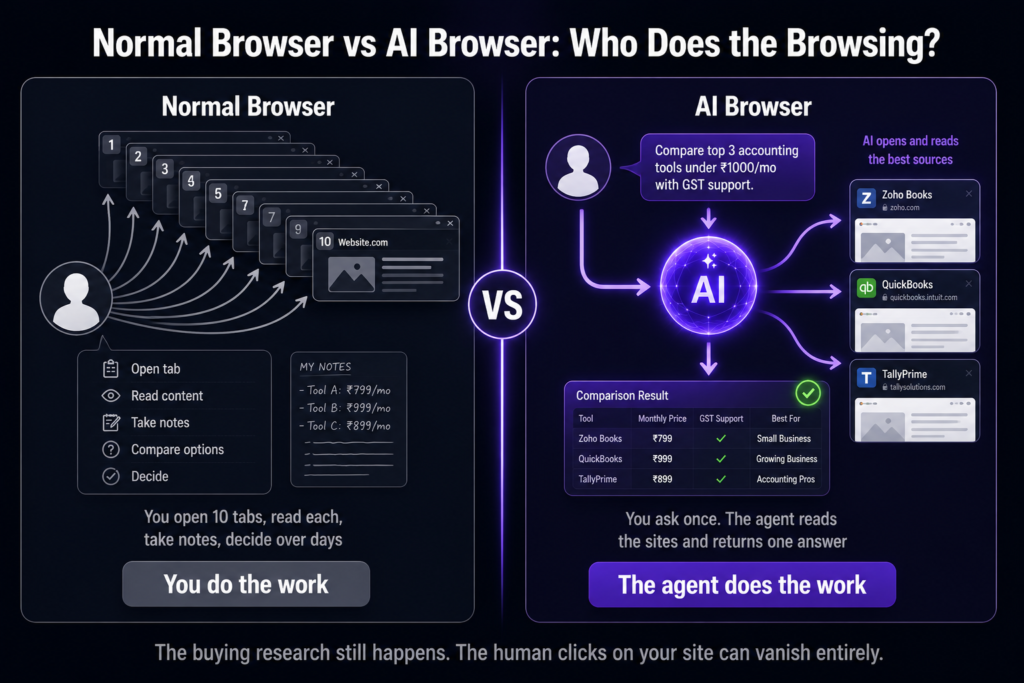
You ask it to find the cheapest flight to Delhi next Friday under a certain budget, and instead of handing you ten links to check yourself, it opens the booking sites, runs the searches, and reports back with options, sometimes ready to complete the booking.
Memory is the quiet revolution underneath all this. These browsers remember what you researched across sessions. If you spent Tuesday looking at cameras, the browser can pick up that context on Thursday and act with knowledge a normal browser never retained. That persistent context is what turns a search tool into an actual assistant, and it changes how people move through the web in ways that ripple straight back to your traffic.
To make this concrete, picture a small business owner in Jaipur researching accounting software. In a normal browser, they open ten tabs, read pricing pages, take notes, and decide over a few days.
In an AI browser, they type “compare the top three accounting tools for a small Indian business under Rs 1,000 a month, including GST features,” and the agent visits the relevant sites, reads the pricing and feature pages, checks for GST support, and returns a structured comparison with sources. The owner never manually opened a single one of those pricing pages.
If your accounting-software comparison was one of the sources the agent read, you contributed to the decision even though your click count shows nothing. If it was not, you were invisible to a buyer who was actively in-market. That is the shift in one example: the buying research still happens, but the human touchpoints with your site can vanish entirely.
The Two AI Browsers That Matter: ChatGPT Atlas and Perplexity Comet
Dozens of products are racing into this space, but two define the category right now. Here is how they compare:
| Feature | ChatGPT Atlas | Perplexity Comet |
|---|---|---|
| Launched | October 2025 | July 2025 |
| Platforms (June 2026) | macOS only | Mac, Windows, iOS, Android |
| Price | Free browser; agent mode needs ChatGPT Plus ($20/mo) | Fully free since March 18, 2026 (incl. agent mode) |
| Strength | Deep agent tied to your ChatGPT history and memory | Built-in cited research engine; cross-tab reasoning |
| Best for | Mac users who pay for ChatGPT and want a personal agent | Anyone, on any device, who wants free agentic research |
| Search choice | ChatGPT-centric | Choose Google or Perplexity per query (hybrid) |
ChatGPT Atlas is the deeper personal agent if you live inside the OpenAI ecosystem. Because it ties into your ChatGPT history and memory, it can act with knowledge of everything you have ever discussed with ChatGPT. That is genuinely useful, but it comes with two hard limits for Indian users: it is macOS only, and the good agentic features sit behind a $20 per month ChatGPT Plus subscription. For a market that runs mostly on Windows and Android phones, those two facts push Atlas to the sidelines for now.
Perplexity Comet is the more accessible of the two AI browsers by a wide margin. It runs on Mac, Windows, iOS, and Android, and since March 18, 2026, the full browser including agent mode is completely free. Its built-in cited research engine is its standout feature: ask it a question and it returns an answer with sources you can verify, and it can reason across multiple open tabs at once. The hybrid search choice, letting you pick Google or Perplexity per query, means you are not locked into one answer engine.
The practical takeaway for Indian users is simple. Comet is the one to actually try, because it is free on Windows and Android, which is where most of India is. Atlas is Mac-only and gated behind a paid plan for the features that matter.
I would not switch my main browser yet, but every Indian freelancer should install Comet this week. It is free, it works on Windows and Android, and its cited research engine alone saves real time on client work. Even if you never make it your default, having it available for research tasks is worth the five-minute install.
How AI Browsers Change Your Website Traffic
The shift AI browsers cause is the same one AI Overviews and AI Mode started, taken one step further. Understanding it means understanding three changes happening at once.
Fewer clicks, higher intent. When an agent summarises three of your competitor’s pages and yours into one answer, the user may never visit any of them. That reduces raw traffic. But the visits that still come through tend to be further down the funnel, because the agent has already filtered out the people who just wanted a quick fact. The visitor who arrives after the agent’s summary is often closer to acting than a cold organic click ever was.
Agentic commerce is already real. Over the Black Friday and Cyber Monday period in 2025, agent traffic to e-commerce sites surged 144.7%. These are not browsers passively reading pages. They are adding items to cart and completing purchases on behalf of users. For anyone running an online store, agents are becoming actual customers in the literal sense, and your site needs to function for an agent navigating it, not just a human clicking through.
The win condition shifts. The goal moves from “rank at position 1” to “be the source the agent cites and trusts.” Rankings still matter, because agents pull heavily from top-ranked content when they synthesise answers, but ranking is now the means rather than the end. Being well-ranked gets you into the pool of sources the agent considers. Being clear, structured, and authoritative is what gets you actually cited from that pool.
Notice that this is the same lesson arriving for the third time. AI Overviews changed the results page by putting a summary on top. AI Mode replaced the results page entirely with a conversation. AI browsers now mediate the whole web, sitting between the user and every site they visit. The disruption keeps escalating, but the correct response has not changed once: be citable and authoritative. The platform is new each time. The playbook is identical.
The AI Browsers Measurement Problem (And Why Your Analytics Look Weird)
Here is the part that is quietly causing confusion in dashboards across the country. Atlas and Comet are both built on Chromium, the same engine as Chrome. That means in your analytics, they look like generic Chrome traffic. Standard bot filters and the usual WordPress security plugins do not catch them, because technically they are not bots in the way those filters define bots. They are real browser sessions, just driven by an AI instead of a person.
The symptom most site owners are seeing without understanding the cause: rising sessions but flat conversions since late 2025. Your traffic numbers go up, your sales do not move, and nothing obvious explains the gap.
Often the explanation is agents walking through your funnel. They land on a page, add a product to cart while comparing options for their user, abandon it when the user picks a different option, and never buy. Every step of that registers as human behaviour in your analytics, but no human was ever going to convert from it.
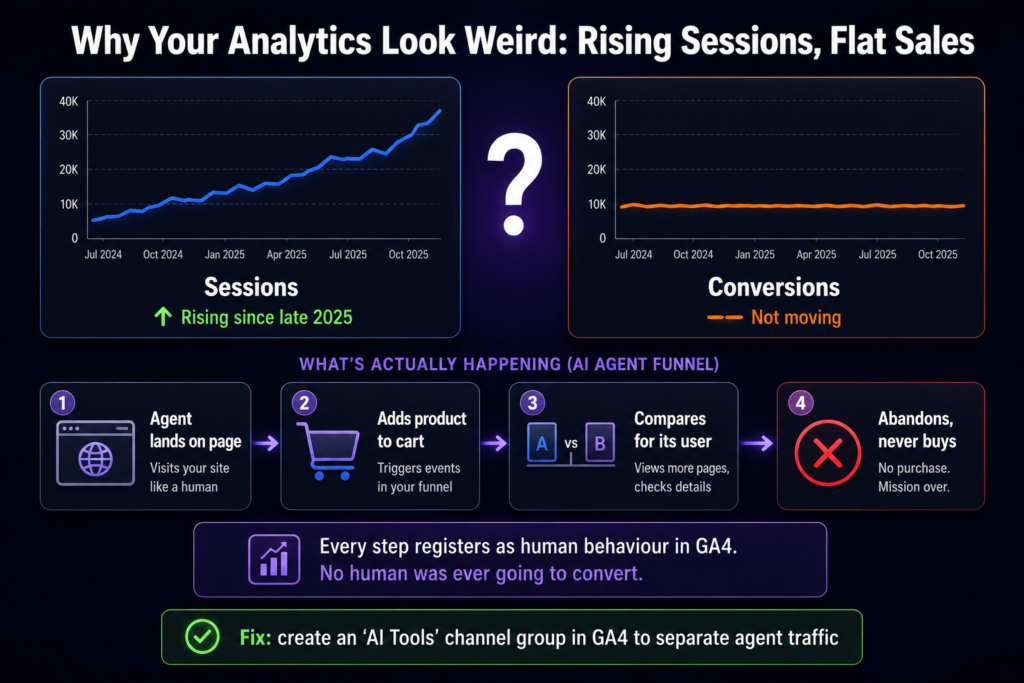
In GA4 specifically, the two AI browsers behave differently. Comet often passes a perplexity.ai referral, which is relatively easy to spot and segment. Atlas frequently blends into direct traffic, which is much harder to isolate. The practical fix is to create an “AI Tools” channel group in GA4 that separates this traffic from your genuine human visits, so your real conversion data stays clean.
Setting this up is not complicated, and it is worth the 20 minutes. In GA4, go to Admin, then Data settings, then Channel groups, and create a custom channel group. Add a rule that captures sessions where the source contains “perplexity” or known agent referrers, and label that channel “AI Tools.”
For the Atlas traffic that hides in direct, you can build a secondary signal by segmenting on behavioural patterns: sessions with unusually fast page transitions, no scroll depth, and cart additions without checkout often cluster as agent behaviour. You will not catch every agent session perfectly, but separating the obvious Comet referrals alone removes a large chunk of the noise from your conversion reports.
Why this matters beyond tidy reporting: agent sessions can train your ad platforms on intent that does not exist. When Meta and Google Ads see agents moving through your funnel, they optimise toward an audience that will never convert, quietly wasting your budget chasing behaviour that was never a buying signal. The fix is filtering and separate logging, not blocking. You do not want to block agents, because some of them are completing real purchases for real users. You want to see them clearly so they do not distort your decisions.
For most small Indian creators, the honest advice is do not panic about fraud or lost traffic. Just understand that a chunk of your “traffic” is now agents, and judge your success by conversions and branded demand rather than raw session counts. The raw number lies more than it used to. The conversion number still tells the truth.
How to Stay Visible in the AI Browsers Era
The good news buried under all this disruption: the actions that keep you visible are concrete, free, and mostly things good content should do anyway.
Front-load your answer. Put the direct answer to your page’s main question in the first 150 words. Agents extract the clearest answer they can find, fast. If your answer is buried under a long introduction, the agent pulls from a competitor who got to the point sooner.
Add structured data. Article, Organization, and FAQ schema make your content machine-readable, so agents can parse it cleanly and cite it confidently. Rank Math generates all of this for free. Schema is how you hand the agent a labelled, organised version of your page instead of making it guess at your structure.
Use clean semantic headings. One clear question per H2, answered completely within that section, so an agent can lift a self-contained chunk without needing the surrounding context. Sections that only make sense after reading three other sections are hard for an agent to use.
Publish original depth. Agents favour sources that contain information they cannot find anywhere else: original data, first-hand experience, unique images, specific examples. This is the part generic AI content cannot fake, which makes it your strongest defence. The more your page contains things that exist nowhere else, the more often agents cite it.
Strengthen brand and entity signals. A consistent brand presence across your own site and the wider web tells agents who to trust when they synthesise an answer from multiple sources. An author and brand that show up credibly across the places people discuss your topic carry more weight than an anonymous page.
Separate agent traffic in GA4. Build the “AI Tools” channel group described above so your real conversion data stays clean and your ad spend is not trained on bot behaviour. This is the one purely defensive move on the list, and it protects both your reporting and your budget.
Notice that this is the same answer-engine optimisation playbook from the AI Mode era, applied to a new surface. The tools change. The principle does not. Be the clear, structured, original, authoritative source that AI quotes, and you stay visible whether the user reaches you through a search page, a conversation, or an AI browser.
The Tool Layer: What Produces AI-Browser-Ready Content
You do not need to buy anything new to adapt to AI browsers. You need to produce well-structured, original, authoritative content, and here is the affordable tool layer that helps.
Structured, scannable content. Surfer SEO, available on GFXToolz, scores your content’s structure and depth against what already gets surfaced for your target queries. It tells you concretely whether your headings, section lengths, and coverage match what agents and search engines are pulling from.
Schema markup. Rank Math, free, generates the Article and FAQ schema that agents read to understand and cite your content. This is the single highest-return free action on the list, because it directly affects machine-readability.
Original images agents cannot find elsewhere. Nano Banana Pro and Flux 2, in the GFXToolz AI Studio, give your pages unique visuals instead of recycled stock photos. As agents increasingly weigh visual uniqueness as a signal of original content, custom images become a small but real edge over pages using the same stock photos as everyone else.
Original data and depth. This is the human part, and no tool produces it for you. AI browsers reward exactly what generic AI content lacks: your first-hand results, your specific numbers, your real experience. The tools make producing and structuring everything around that depth faster and cheaper, but the depth itself has to come from you.
The honest summary: AI browsers do not require you to spend on anything new or exotic. They reward well-structured, original, authoritative content, which the affordable GFXToolz stack already helps you produce at a fraction of retail tool prices. The adaptation is about how you write and structure, not about a new purchase.
For the full plan breakdown, see the GFXToolz pricing guide (Post #28).
FAQ
What is an AI browser and how is it different from Chrome?
An AI browser puts a language model at the centre of browsing rather than in a sidebar. It reads pages, answers questions, and acts on your behalf, navigating sites, filling forms, and completing tasks. Chrome with a Gemini sidebar or Edge with Copilot are browsers with AI features added on; true AI browsers like ChatGPT Atlas and Perplexity Comet are AI-first, where the assistant drives the entire experience.
Is Perplexity Comet free in 2026?
Yes. Since March 18, 2026, the full Comet browser, including agent mode, is free across Mac, Windows, iOS, and Android. It is the only fully agentic AI browser that is free on every platform. Paid add-ons exist (Comet Plus at $5 per month and Perplexity Pro at $20 per month), but the core agentic browser costs nothing, which makes it the most accessible AI browser for Indian users on Windows and Android.
Do AI browsers hurt my website traffic?
They reduce raw clicks but often deliver higher-intent visits. The bigger issue is measurement: AI browsers look like generic Chrome in analytics, so rising sessions with flat conversions since late 2025 are often agent traffic walking through your funnel. The response is not to block them, but to front-load your answers, add schema, separate agent traffic in GA4, and judge success by conversions and branded demand rather than raw session counts.
How do I optimise my content for AI browsers?
Front-load the direct answer to your page’s main question in the first 150 words, add Article and FAQ schema, use clean semantic headings with one question per section, and publish original depth (data, experience, unique images) that agents cannot find elsewhere. This is the same answer-engine optimisation approach that already works for Google AI Mode and AI Overviews, applied to a new surface.
Should Indian freelancers and businesses worry about AI browsers in 2026?
Worry, no. Adapt, yes. AI browsers are still a small share of total traffic but growing very fast. The practical moves are simple and free: install Comet to use it yourself for research, structure your content to be citable, add schema, and separate agent traffic in your analytics. Small creators who adapt early build an advantage before the category matures and the competition catches on.
The Third Wave of the Same Shift
AI browsers are the third wave of one continuous shift. AI Overviews changed the results page. AI Mode replaced it with a conversation. Now agentic AI browsers mediate the entire web, sitting between users and every site they visit. Through all three waves, the response has not changed: be the clear, structured, original, authoritative source that AI cites, and you stay visible regardless of which surface the user arrives through.
Install Perplexity Comet this week, since it is free, and see for yourself how your own content appears inside an AI browser. Then front-load your answers and add schema to your top five pages. That is a single afternoon of work against a shift that is only accelerating.
Agent traffic rose 6,900% in a year. The creators who structure their content to be cited, not just clicked, are the ones AI browsers will keep surfacing.
Leave a Comment