


Published by GFXToolz AI | Last updated: March 2026
If you’ve ever tried finding good blog images on a budget, you already know how annoying it gets.
You need a few clean visuals for a post, maybe a thumbnail, maybe some supporting graphics — and suddenly you’re either looking at paying a designer a few thousand rupees or downloading the same stock photos that half the internet is already using.
That’s exactly where the Nano Banana AI image generator on GFXToolz becomes useful.
Instead of spending hours searching for the “perfect” image, you can open the GFXToolz AI image generator, type what you want, and get a custom image in around 15 seconds. No waiting, no design back-and-forth, and no generic visuals that look copied from another blog.
For bloggers, freelancers, and creators in India, this is honestly one of the easiest ways to make your content look more original without increasing your content budget. And if you’ve been searching for an AI image generator India free option that still gives professional-looking results, this is the kind of tool worth testing.
The biggest advantage? Your visuals actually feel made for your content. Whether you need a featured image, product-style mockup, social media graphic, or blog illustration, you can create something unique instead of reusing what everyone else is already posting.
In this nano banana pro guide 2026, I’ll show you how to use it properly, what kind of prompts work best, and how to get cleaner, more polished results even if you’re not a designer.
And if you’re trying to decide between models before using it seriously, I’ll also touch on the nano banana vs flux 2 guide side of things so you can understand where each one performs better.
By the end of this guide, you’ll know how to use the Nano Banana AI image generator on GFXToolz to create blog images, product visuals, and social content that actually look good — without wasting money or time.
What the Nano Banana AI Image Generator Actually Is
Nano Banana is Google’s AI image generation model, built into the Gemini platform. The latest version — Nano Banana 2 — launched in February 2026 and combines the output quality of Nano Banana Pro (studio-grade images, accurate text rendering) with the generation speed of Gemini Flash.
Three things separate it from Midjourney or standard DALL-E:
Text rendering accuracy. Nano Banana renders text inside images correctly in 100+ languages with near-zero spelling errors. Ask a Midjourney user to generate an image with readable text — you’ll get garbled characters and nonsense words. It’s a known, persistent limitation. Nano Banana Pro gets it right, which matters every time you need a blog thumbnail with a readable headline, a social graphic with pricing, or an infographic with labelled sections.
Character consistency. If your blog uses a recurring character — a mascot, a persona, an illustrated guide figure — Nano Banana maintains that character’s appearance across multiple images. Useful for building a coherent visual identity across a content series.
Generation and editing in one. Upload an existing image with a text prompt to edit specific elements. Change the background on a product photo, add text overlays, modify colours — without Photoshop.
Why this matters for SEO: AI-generated images are original content. Google Image Search indexes them. If no other website has those images, you have unique visual content that contributes to your page’s originality. Posts using the same stock photo as 200 other sites don’t get that benefit.
GFXToolz AI Studio includes Nano Banana Pro as part of its 40+ AI model collection, alongside Flux 2, Kling 2.5, Runway ML, and Google Lyria.
The nano banana AI image generator renders text accurately in 100 plus languages
Nano Banana Pro vs Flux 2: which to use when
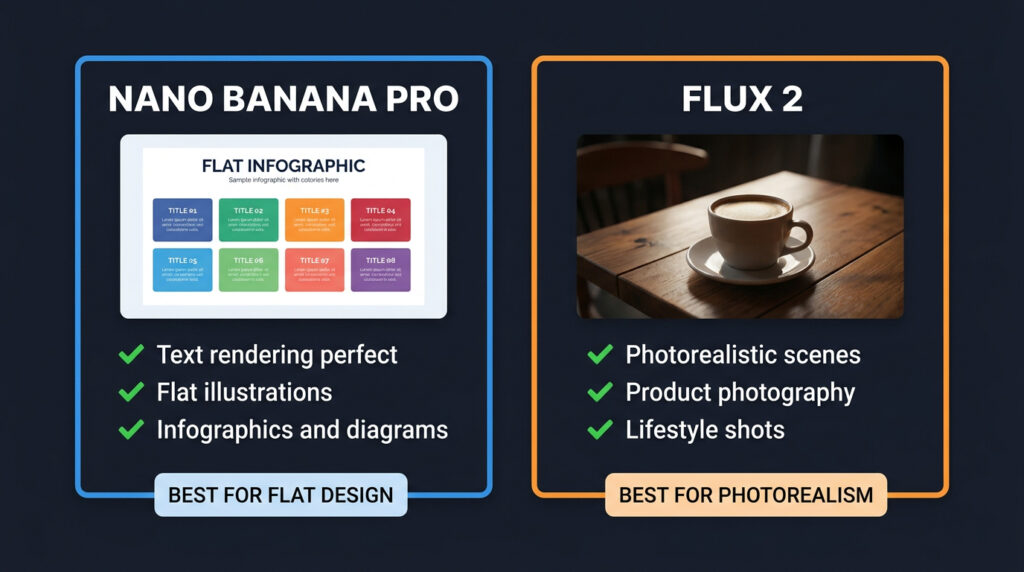
GFXToolz AI Studio gives you both Nano Banana Pro and Flux 2. Knowing which to use for each image type saves time and produces better results.
| Feature | Nano Banana Pro | Flux 2 |
|---|---|---|
| Best for | Flat illustrations, infographics, social graphics, text-heavy images | Photorealistic scenes, product photography, lifestyle shots |
| Text rendering | Best in class — accurate in 100+ languages | Good, less reliable for long text or multiple languages |
| Character consistency | Excellent across multiple images | Good with reference images |
| Speed | Very fast (seconds) | Moderate — higher quality settings take longer |
| Image editing | Built-in — upload image + text prompt to edit | Limited editing, better for generation from scratch |
| Style range | Flat design, cartoon, watercolor, 3D figurines, diagrams | Strongest at photorealism and cinematic looks |
The practical rule: flat digital illustration → Nano Banana Pro. Realistic or photorealistic scene → Flux 2.
A step-by-step process infographic with labelled boxes? Nano Banana Pro. A product lifestyle shot showing your item in a kitchen setting? Flux 2. A comparison table showing ₹423 vs ₹11,600 pricing? Nano Banana Pro. A founder’s office environment for an About page? Flux 2.
Both are available in GFXToolz AI Studio from the same dashboard.
Choosing between the nano banana AI image generator and Flux 2 depends on image type
How to Access the Nano Banana AI Image Generator on GFXToolz
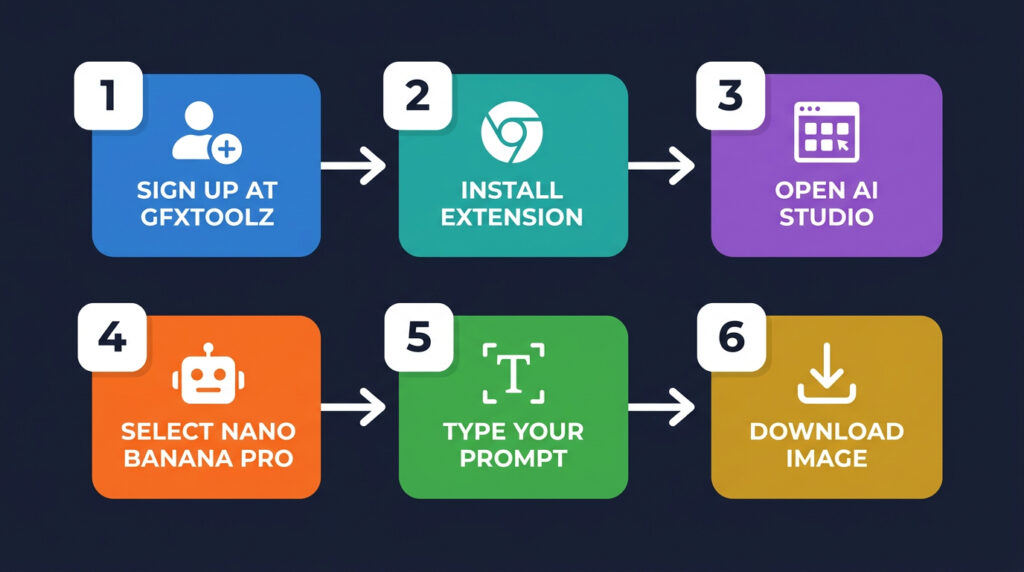
- Sign up at gfxtoolz.ai. Free tier available, no credit card required. Basic plan starts at ₹423/month.
- Log into your GFXToolz dashboard. Install the Chrome extension when prompted — this handles authentication for all shared tools in the library.
- Click on AI Studio from the main navigation menu.
- Select Nano Banana Pro from the model list. Flux 2, Kling 2.5, and other models are listed in the same menu — switch between them for different image types.
- Type your prompt in the text box. The more specific, the better. Describe the subject, style, background, colours, composition, and aspect ratio.
- Click Generate. Your image appears in 10–20 seconds.
- Download directly. No watermarks on downloaded images at paid tiers.
Plan comparison:
| Plan | Price | AI Studio access | Best for |
|---|---|---|---|
| Free | ₹0 | Limited daily generations | Testing the tool, occasional use |
| Basic | ₹423/month | 10 images/day + SEO tools | Bloggers with weekly publishing schedule |
| Standard | ₹550/month | Extended AI access + more models | Active bloggers and freelancers |
| Premium | ₹846/month | Full AI Studio, 40+ models, 50 generations/day | Content creators, agencies, e-commerce stores |
Cost comparison: Google Gemini Pro with Nano Banana access costs $20/month (~₹1,650) for image generation alone. GFXToolz Premium at ₹846/month gives you Nano Banana Pro plus Flux 2, Kling 2.5, Runway ML, Canva Pro, Semrush, Ahrefs, and 140 other tools at roughly half the cost of Gemini Pro standalone.
Accessing the nano banana AI image generator takes under 5 minutes on GFXToolz
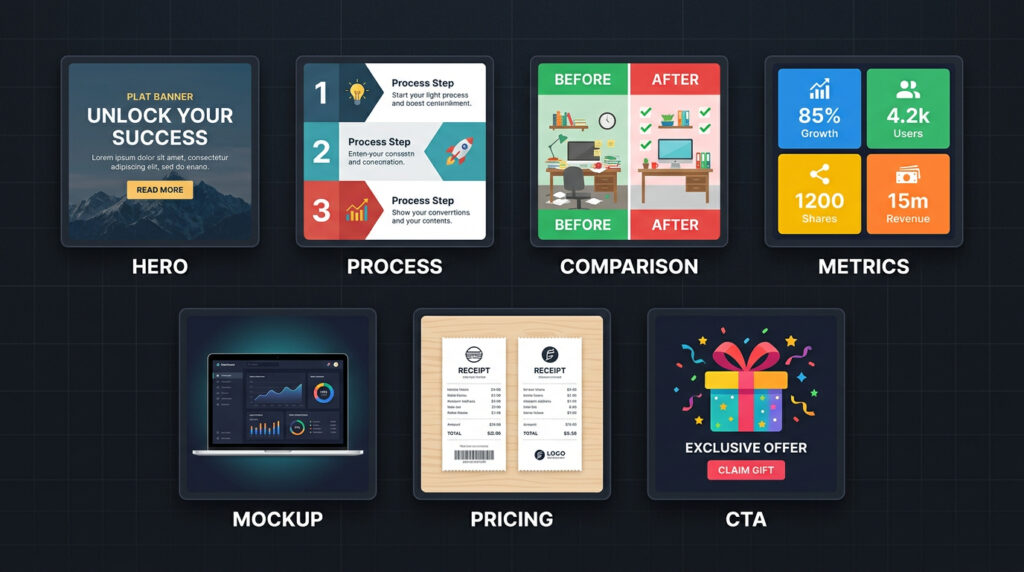
7 Types of Blog Images to Create with Nano Banana AI Image Generator
1. Nano Banana AI Image Generator: Featured Hero Image
The main image at the top of your post and in social media preview cards. People see this before clicking. It needs to be bold, recognisable at small sizes, and relevant to the topic.
Prompt:
Flat digital illustration, dark navy background, 1200x630px wide format. A large magnifying glass in the centre with the words “SEO TOOLS 2026” in bold white text inside the lens. Bright blue and gold colour accents. Three small floating keyword tags around the magnifying glass. Clean modern design with bold outlines. No people.
Model: Nano Banana Pro
2. Nano Banana AI Image Generator: Process Infographic
A numbered workflow, step-by-step process, or how-to sequence. These images get shared and often appear in featured snippets.
Prompt:
Flat digital illustration, dark background, six rounded cards arranged in two rows of three. Each card has a white number badge (1 through 6) and a simple icon below it. Connected by white directional arrows. Card colours: alternating teal and purple. Bold white text labels below each icon. Clean flat design. Wide 16:9 format.
Model: Nano Banana Pro
3. Nano Banana AI Image Generator: Comparison Visual
Side-by-side comparison between two options, tools, or price points. Works particularly well for pricing posts.
Prompt:
Flat digital illustration. Split design with a white vertical dividing line. Left side: dark red background, large red X icons, a price tag showing ₹11,600. Right side: bright green background, large green checkmarks, a price tag showing ₹423 with a checkmark. Small text under each side reading “Direct Subscription” and “GFXToolz Basic”. Wide 16:9 format.
Model: Nano Banana Pro
4. Nano Banana AI Image Generator: Data Metrics Card
Visual explanation of SEO metrics, concepts, or statistics. Useful for making abstract data concrete.
Prompt:
Four equal square cards in a 2×2 grid layout on dark navy background. Card 1: orange icon of a chart, text “Domain Rating” with a scale from 0 to 100. Card 2: blue magnifying glass icon, text “Search Volume” with an upward arrow. Card 3: green target icon, text “Keyword Difficulty” with a difficulty meter. Card 4: red link icon, text “Backlinks” with a chain icon. Bold flat design. White text. Wide 16:9.
Model: Nano Banana Pro
5. Nano Banana AI Image Generator: Dashboard Mockup
Shows a laptop or phone displaying a tool interface. Creates the visual impression of using the tool without needing an actual screenshot.
Prompt:
A modern laptop on a dark wooden desk, screen displaying an SEO analytics dashboard with colourful bar charts, a line graph showing traffic growth, and keyword ranking data. Screen glow illuminates the desk surface. Shallow depth of field, background dark and blurred. Cinematic lighting. Photorealistic. Wide 16:9.
Model: Flux 2 (photorealistic)
6. Nano Banana AI Image Generator: Pricing Comparison
Physical receipts showing cost comparison. More tangible than a digital comparison card.
Prompt:
Flat lay photography of two paper receipts on a warm wooden desk. Left receipt is large and crumpled, total amount shows ₹34,300 circled in red marker. Right receipt is clean and small, total shows ₹423 circled in green marker with a tick mark. Warm desk lighting from above. Soft shadows. Photorealistic. Wide 16:9.
Model: Flux 2 (photorealistic)
7. Nano Banana AI Image Generator: CTA Visual
End-of-post image encouraging a sign-up, free trial, or download.
Prompt:
Dark navy background, a large illustrated gift box with bright green ribbon in the centre. Gold label attached to the ribbon reading “FREE TIER”. Giant gold numbers showing ₹0 floating above the box. Four small floating icons around the box: a magnifying glass, a bar chart, a paintbrush, and a robot face. Flat digital illustration style. Wide 16:9.
Model: Nano Banana Pro
These 7 templates cover every use case for the nano banana AI image generator.
Prompt engineering: what actually works
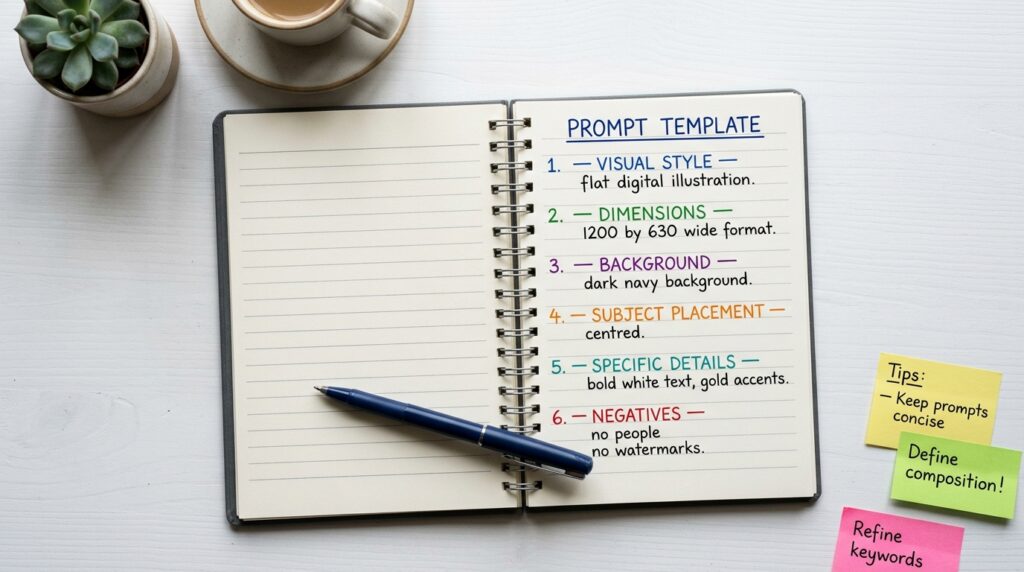
The quality of your output depends almost entirely on how you write the prompt. Here’s what makes the difference:
Start with the visual style. The first words set the overall aesthetic. “Flat digital illustration” gives you clean design work. “Photorealistic photograph” produces realistic images. “Cinematic wide shot” gives dramatic lighting. “Watercolor illustration” gives soft artistic results. Skip this and results are unpredictable.
Specify your dimensions. “1200x630px wide format” for blog featured images. “1080×1080” for Instagram square posts. “1080×1920” for stories or Reels. Without dimensions, aspect ratios vary and you’ll be cropping everything.
Describe the background first. “Dark navy background” or “pure white background” or “wooden desk surface” — the background frames everything else. Describe it before your subject.
Place your subject deliberately. “Centred” or “left side of frame” or “floating at a slight angle” tells the model where to put the main element. Without placement instructions, compositions drift.
Include specific details. Colours by name, exact text to render, number of elements, icon descriptions. “A large blue circle with the number 5 in white” produces something specific. “A shape with a number” produces something random.
End with negatives. “No people. No text logos. No watermarks. No borders.” Prevents unwanted elements.
For text in images: Nano Banana Pro is the only model that renders text reliably. Spell out exactly what you want: text reading “KEYWORD RESEARCH GUIDE 2026” in bold white uppercase letters. If you need Hindi or another Indian language, specify it explicitly.
Iterate. Your first prompt rarely produces the perfect image. Change one element per attempt — adjust the background colour, simplify the composition, or swap the style descriptor — and regenerate. Most images reach a usable result within 2–3 attempts.
Better prompts produce better results from the nano banana AI image generator
How the Nano Banana AI Image Generator Helps Your SEO
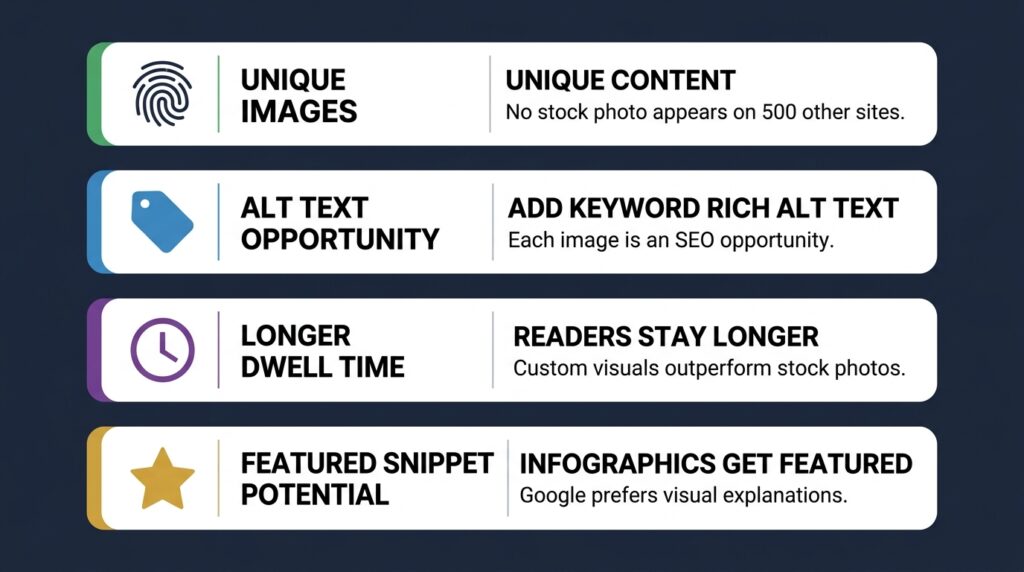
Using AI-generated images isn’t just cheaper than stock photos. It directly affects your SEO.
Unique images count as unique content. Google’s image index compares images across the web. Stock photos appear on thousands of pages. An AI-generated image exists only on your page. When the same image is indexed on 200 sites, it adds nothing to any individual page. When it’s only on yours, it does.
Alt text opportunities. Every image is a new opportunity for keyword-relevant alt text. A featured image for a keyword research post: alt="step-by-step keyword research process diagram 2026". This contributes to on-page SEO and Google Image Search rankings.
Dwell time. Posts with custom, relevant visuals keep readers on the page longer than generic stock photography. A reader who glances at a thumbnail and recognises it from somewhere else moves on quickly. One they haven’t seen before tends to stop and look.
Featured snippet potential. Posts with clear step diagrams and labelled infographics are more likely to appear in Google’s featured snippet or “How to” rich results. Google prefers to feature content that includes visual explanations alongside text.
File naming and compression. Name image files descriptively before uploading: nano-banana-ai-keyword-research-infographic.jpg rather than image3.jpg. Compress every image before upload — WebP format gives the smallest file size at equivalent quality. Uncompressed images are the most common cause of slow page speed, and slow pages hurt rankings.
For the full technical SEO checklist including image optimisation, see the SEO Audit Tutorial in this series.
Unique images from the nano banana AI image generator directly improve your SEO.
Cost comparison for Indian users
| Tool | Monthly cost | INR equivalent | What you get |
|---|---|---|---|
| Midjourney Basic | $10/month | ~₹830 | ~200 images/month. Image generation only. |
| Gemini Pro (Nano Banana) | $20/month | ~₹1,650 | Image generation + Gemini chat. Nothing else. |
| Ideogram Plus | $20/month | ~₹1,650 | 1,000 priority credits. Image generation only. |
| Canva Pro (Magic Studio) | $13/month | ~₹1,080 | 500 AI images + design tools + stock photos |
| GFXToolz Premium | ₹846/month | ₹846 | Nano Banana + Flux + Kling + Wan + Canva Pro + Semrush + Ahrefs + 140 other tools |
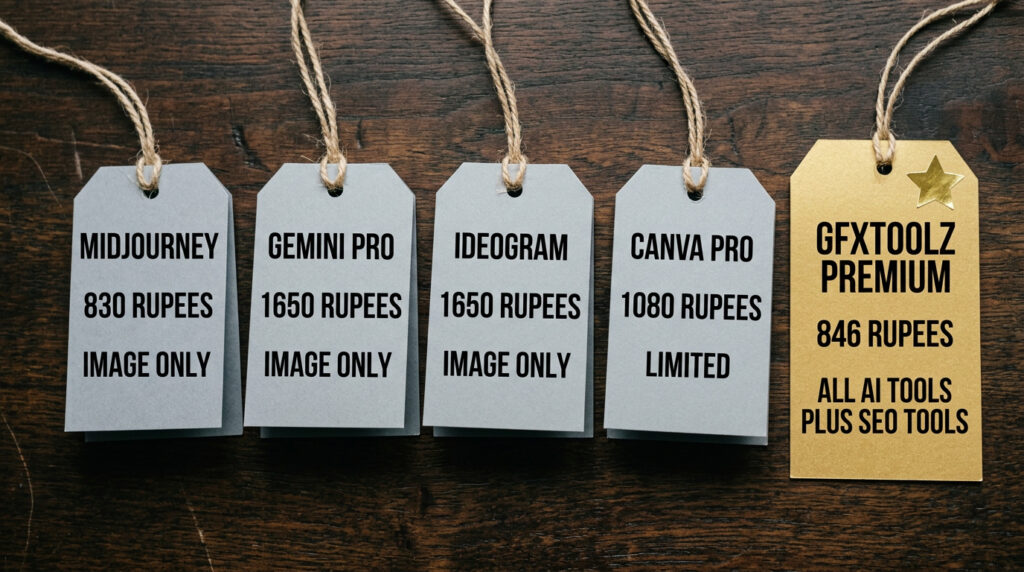
Every alternative charges ₹830–1,650/month for one tool. GFXToolz Premium at ₹846/month includes Nano Banana Pro alongside six other AI generation models, professional SEO tools, design tools, and content tools. For Indian users who also need keyword research and backlink analysis, paying ₹1,650/month for image generation alone doesn’t add up.
GFXToolz Basic at ₹423/month includes 10 AI image generations per day alongside 100+ SEO and design tools. For bloggers publishing 2–3 posts per week, 10 daily generations covers all the featured images and inline visuals each post needs.
The nano banana AI image generator on GFXToolz costs less than any standalone alternative
FAQ
Is Nano Banana AI free on GFXToolz?
The free tier includes limited daily test generations — enough to try the tool and evaluate quality before committing. For regular blogging, Basic at ₹423/month gives you 10 AI image generations per day alongside 100+ SEO tools. Premium at ₹846/month increases this to 50 generations per day with full access to all 40+ AI models.
The nano banana AI image generator free tier lets you test before paying.
What’s the difference between Nano Banana and Nano Banana Pro?
Nano Banana (standard) is based on Gemini Flash — optimised for speed. Nano Banana Pro is based on Gemini Pro Image — higher fidelity, more accurate text rendering, better compositional control, studio-grade detail. GFXToolz AI Studio includes the Pro version, not the base model.
Nano Banana Pro is the premium version of the nano banana AI image generator.
Can I use Nano Banana AI images commercially?
Yes. Images generated through GFXToolz AI Studio can be used for your blog, social media, client work, and commercial projects. Google’s Nano Banana model adds SynthID invisible watermarks for AI content identification — embedded in file metadata, not visible in the image, and they don’t affect commercial use.
Which is better for blog images: Nano Banana or Flux 2?
Infographics, step diagrams, comparison visuals, or anything requiring accurate text: Nano Banana Pro. Photorealistic scenes, product photography, and cinematic lifestyle imagery: Flux 2. You switch between them in the same AI Studio dashboard. For flat illustrations use the nano banana AI image generator — for photos use Flux 2.
How many images can I generate per day?
Free tier: limited test generations. Basic and Standard plans: 10–20 images per day. Premium: 50 images per day with priority access to all models including Nano Banana Pro, Flux 2, Kling 2.5, Runway ML, and Google Lyria. For agencies handling multiple client deliverables daily, Premium’s 50-generation limit covers most production workflows. Premium plan gives 50 daily generations from the nano banana AI image generator
The bottom line
The seven prompt templates above are practical starting points — copy them, swap the subject matter for your niche, and regenerate until the result works. Nano Banana Pro for flat illustrations, infographics, and anything requiring accurate text. Flux 2 for photorealistic scenes and product photography.
The nano banana AI image generator is the most capable text-in-image AI tool available
Start using the nano banana AI image generator free at gfxtoolz.ai today
Also read:


1 Comment