


Published by GFXToolz AI | Last updated: June 2026
Search “canva pro group buy” and you get three kinds of results: $0.99 offers that sound too good to be true, Rs 299 “lifetime” deals on WhatsApp, and official Canva pricing at Rs 499 per month. One of these gets your client files deleted mid-project. This guide explains which one, and why.
The underlying pressure is real. Canva Pro at Rs 499 per month is reasonable on its own. But working designers do not need Canva alone. They need Canva plus Envato Elements plus stock photos plus an AI image tool plus a grammar checker. That stack costs Rs 8,725 per month at retail, and the pressure to cut corners on that number is exactly what scam resellers exploit.
This post covers what a Canva Pro group buy actually is, the honest legality and safety picture, real 2026 Canva Pro group buy pricing across every option, a 5-point scam-spotting checklist, and the total-stack math that most comparison pages skip entirely.
What a Canva Pro Group Buy Actually Is (And What It Is Not)
A Canva Pro group buy, properly understood, works like this: a platform purchases premium subscriptions at scale and shares managed access among many users, splitting the cost. The key word is managed. Your access runs through the platform’s own dashboard. You never receive a Canva login, and you never share an account directly with strangers.
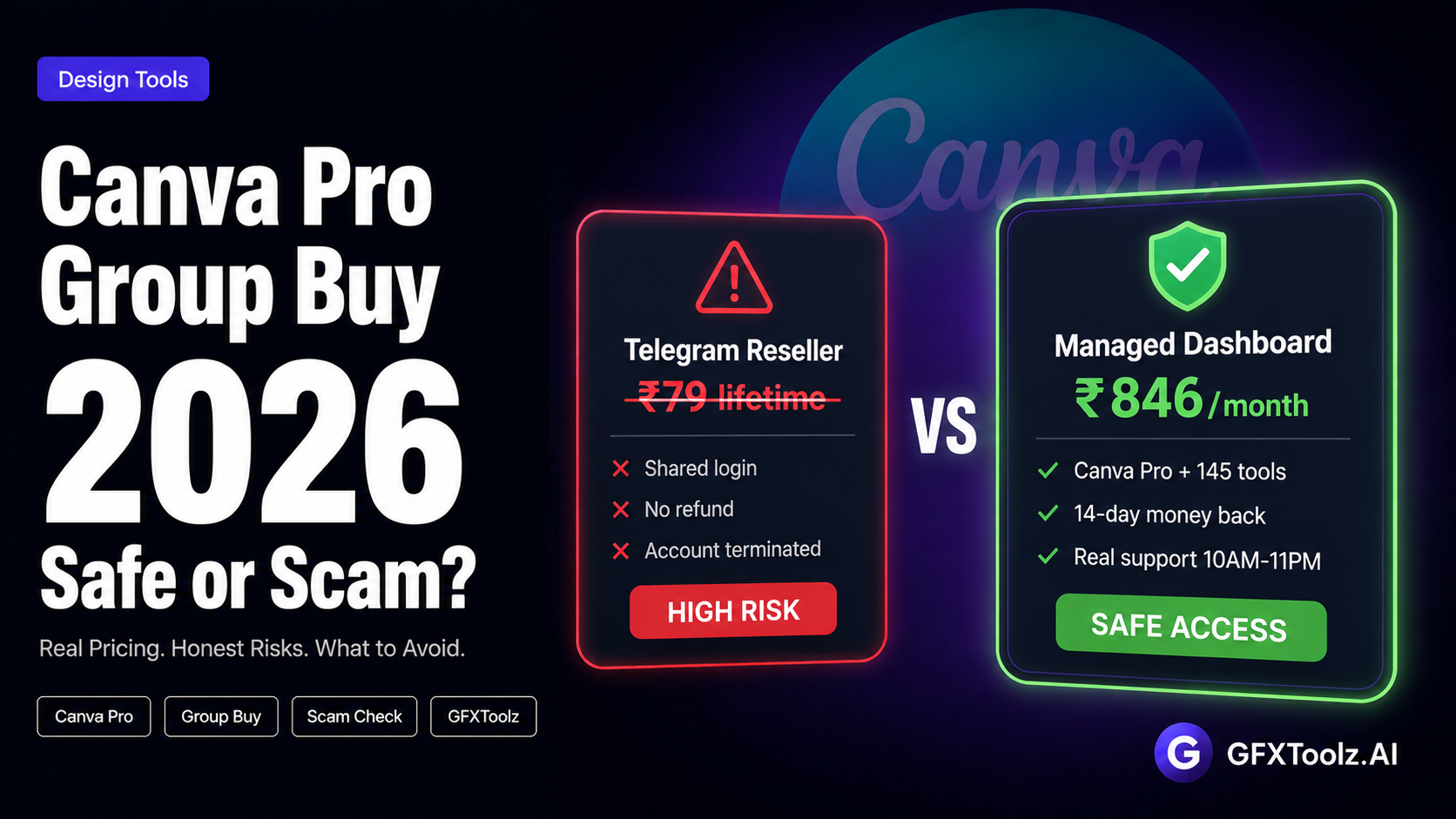
What a Canva Pro group buy is NOT: a Telegram seller handing out education-account logins. A Rs 299 “lifetime Canva” listing on Etsy or Instagram. A shared password sold for Rs 79. Those are account exploits dressed up in group-buy language, and treating them as the same category is how people lose work.
There are three access models in this market, and the differences matter more than the prices:
Managed dashboard platforms (GFXToolz, Toolsurf). The platform holds the upstream accounts and routes your access through its own interface. You log into the platform, click the Canva tile, and work in a Pro workspace.
Team-invite resellers (the Keys-Shop model). The seller adds your email to a Canva team they control. Better than a shared password, but your access depends entirely on that one seller’s account health and honesty.
Shared-login sellers (the dangerous one). You receive an email and password used by an unknown number of other buyers. Your designs sit in an account other strangers can open.
Why this distinction is the most important thing in this entire post: when Canva audits and bans an upstream account, a managed dashboard platform replaces it on their side and your access continues. A shared-login buyer loses the account, the access, and every design stored inside it, with no warning and no recourse. Same search term, completely different risk.
Is Canva Pro Group Buy Safe and Legal? The Honest Answer
Most pages targeting this keyword dodge the question. Here is the straight version.
Canva’s official position: purchases through unauthorized third-party sellers go against their Terms of Use. That is stated plainly in Canva’s terms, and no Canva Pro group buy platform, including GFXToolz, is an authorized Canva reseller. Pretending otherwise would be dishonest, so we will not.
What that means in practice is a risk spectrum, not a single yes or no:
Official subscription: zero risk. Full Terms of Use compliance, direct account ownership, Canva support. This is the baseline every other option should be compared against honestly.
Managed Canva Pro group buy platform: low practical risk. The worst realistic case is that an upstream account gets flagged and the platform swaps it for a fresh one, which happens on the platform’s side without you losing your exported work. Your own designs should always be exported and backed up regardless.
Reseller team invites: medium risk. Your access depends entirely on one seller’s account practices. Some are careful. Many are not. You have no way to verify which kind you bought from until something breaks.
Shared education-account logins: high risk. These accounts get terminated in Canva’s audits, there is no support and no refund when it happens, and your design files are visible to every other person who bought the same login. This is the option that ends with deleted client files mid-project.
So what does “safe” actually mean when evaluating any Canva Pro group buy provider? Four practical tests: your designs can be exported and backed up at any time. The payment comes with a published refund guarantee. Support answers before your client deadline, not three days after. And the provider has a verifiable track record rather than a Telegram handle created last month.
On those tests, here is where GFXToolz stands: managed dashboard access, support available 10AM to 11PM IST, a 14-day money-back guarantee, and 10,000+ subscribers. And one honest note that belongs in this section: group buy access is a budget bridge, not an official Canva plan. It exists because the full retail stack is unaffordable for most Indian freelancers, not because it is equivalent to buying direct.
I would rather lose a reader to an official Canva subscription than gain a customer who feels misled. If your budget allows Rs 3,999 per year for the official annual plan and Canva is genuinely the only tool you need, buy official. A Canva Pro group buy makes sense when you need the full stack, and that is the case this post will actually make with numbers.
Canva Pro Group Buy Pricing in 2026: Every Option Compared
Here is the complete Canva Pro group buy pricing picture, including the options that compete with GFXToolz and the ones nobody should touch:
| Option | Price (INR) | Access Model | What Else You Get |
|---|---|---|---|
| Canva Pro official (monthly) | Rs 499/mo | Direct account | Canva only; zero risk; full ToS compliance |
| Canva Pro official (annual) | Rs 3,999/yr (Rs 333/mo) | Direct account | Canva only; 33% cheaper than monthly |
| Canva for Education / Nonprofits | Rs 0 | Verified direct account | Free Pro for eligible teachers, students, nonprofits |
| Toolsurf group buy | ~Rs 83 ($0.99 hook) | Managed dashboard | Canva-focused; USD pricing; 24-hour refund window only |
| EnterTool group buy | Rs 149/mo | Managed dashboard | Canva only at this price; other tools cost extra |
| Telegram/Instagram resellers | Rs 79–299 “lifetime” | Shared/education logins | Account termination risk; zero support; privacy exposure |
| GFXToolz Premium | Rs 846/mo | Managed dashboard | Canva Pro + Envato Elements + Nano Banana Pro + Flux 2 + Kling 2.5 + Grammarly + 140 more tools |
Reading this table honestly, because that is the point of this post: if Canva is your only tool need, GFXToolz is not the obvious answer. Official annual at an effective Rs 333 per month is the zero-risk option, and a cheap single-tool Canva Pro group buy at Rs 83 to Rs 149 is the lowest-cash option. Both beat a Rs 846 plan for a one-tool user.
GFXToolz wins the moment you need a second or third tool. And as the next section shows, nearly every working designer needs four or five.
Canva Pro Group Buy vs the Full Design Stack: The Real Math
Single-tool comparisons miss what actually happens in a working month. Here is what designers buy alongside Canva, at retail:
Envato Elements for fonts, templates, and mockups: Rs 1,370 per month. Stock photo subscriptions for client work: roughly Rs 2,500 per month. An AI image tool for custom visuals: Rs 840 per month. A grammar and writing tool for client-facing copy: Rs 1,500 per month. Add Canva Pro itself at Rs 499 and the working stack lands at Rs 8,725 or more per month.
Now run the cheap single-tool Canva Pro group buy against that. Canva at Rs 149 per month saves you Rs 350 versus official. You are still carrying Rs 6,000+ per month of other subscriptions. The Rs 149 deal optimized the smallest line item in the budget.
GFXToolz Premium at Rs 846 per month covers the entire stack in one login: Canva Pro, Envato Elements, Nano Banana Pro and Flux 2 for AI images, Kling 2.5 for video, Grammarly, and 140 other tools.
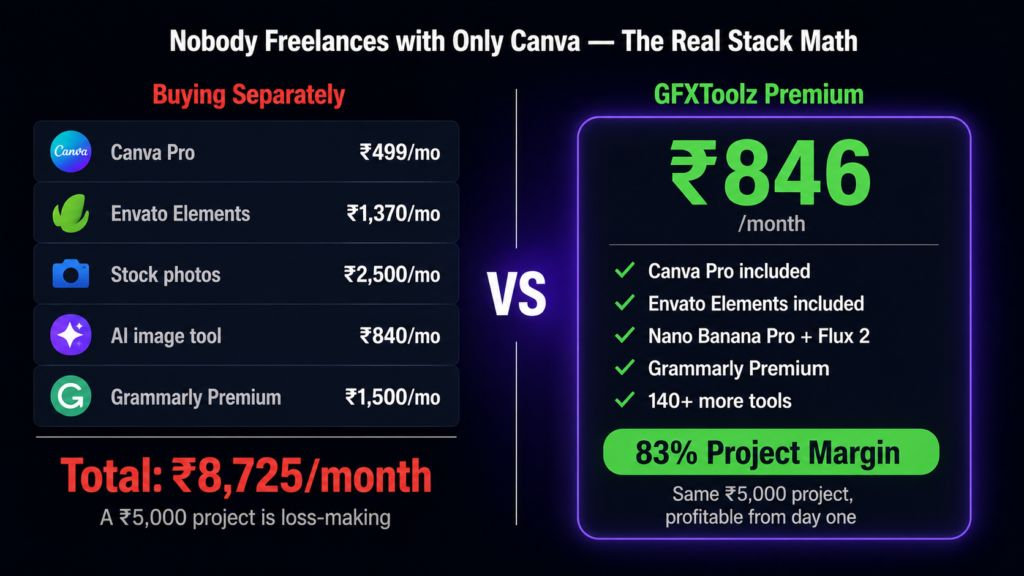
A worked example with real freelance numbers. A client orders a social media kit at Rs 5,000. On the retail stack, your tool cost that month is Rs 8,725, which means the project is loss-making until the second client arrives. On GFXToolz, your tool cost is Rs 846, which means the same project carries an 83% margin from day one. Same client, same deliverable, same skill. The only variable that changed is tool economics.
Single-tool Canva Pro group buy pages are answering the wrong question. Nobody freelances with only Canva. The moment you price the whole stack, the comparison stops being close.
How to Spot a Canva Pro Group Buy Scam (5-Point Checklist)
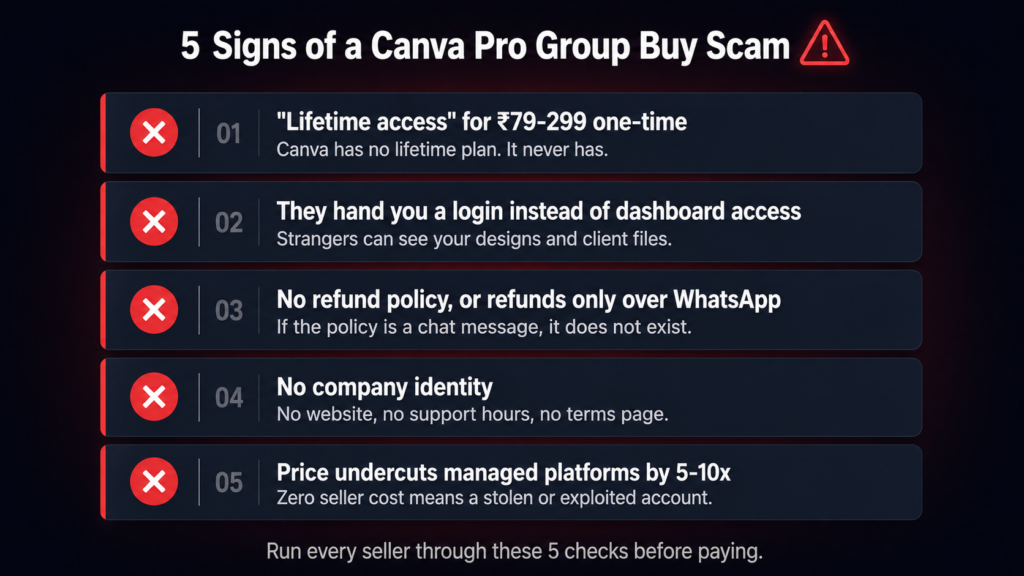
Run any Canva Pro group buy seller through these five checks before paying. Each one takes under a minute.
1. “Lifetime access” for a one-time Rs 79 to Rs 299 payment. Canva has no lifetime plan. It has never had a lifetime plan. Anyone selling one is selling a shared or education-exploit account with a countdown to termination already running. The word “lifetime” in this market means “until the next Canva audit.”
2. They hand you a login instead of dashboard access. A shared email and password means an unknown number of strangers can open the same account and see your designs and client files. It also means the account dies the moment Canva’s systems flag multi-location logins, which they are built to do. Managed platforms never give you the upstream credentials.
3. No refund policy, or refunds promised only over WhatsApp. Legitimate platforms publish their guarantee where you can read it before paying. GFXToolz publishes 14 days. Even Toolsurf publishes 24 hours. A seller whose refund policy is a chat message is a seller whose refund policy does not exist.
4. No company identity. No website with a checkable domain history. No support hours. No terms page. No registered payment processing. A Telegram handle is not a business, and when your access dies there will be no one to escalate to.
5. The price undercuts managed platforms by 5 to 10x. Managed group buy economics bottom out around Rs 80 to Rs 150 per month for a single tool, because real subscriptions are being purchased upstream. A Rs 299-per-year price means the seller’s cost is zero, and the only way a seller’s cost is zero is when the account is stolen or exploited. The price is not a deal. It is the disclosure.
What You Get with Canva Pro Group Buy Access on GFXToolz
The core Pro feature set comes through fully via the dashboard: 600,000+ premium templates, the 100 million+ stock photo and element library, Brand Kit for storing client colours and fonts, Magic Resize for converting one design across platform formats, Background Remover, Content Planner for scheduling, and the Magic Studio AI tools.
One honest limitation to state up front: because access runs on shared infrastructure, some team-specific features may behave differently than they would on a personal Pro account. Individual design work, exports, Brand Kit, and the full template and asset libraries work as expected. Inviting your own team members into a workspace is where the shared model differs from owning the subscription. Most solo freelancers never touch the difference; agencies running multi-seat workflows should weigh it.
The access flow is short: log into the GFXToolz dashboard, find the Canva Pro tile in the tool grid on the left-sidebar interface, click it, and the Pro workspace opens in your browser. No extension juggling, no credentials to manage.
The workflow bonus is where the Premium plan earns its price for designers. From the same dashboard: pull fonts and mockups from Envato Elements, generate custom illustrations in Nano Banana Pro, produce photorealistic product or lifestyle shots in Flux 2, and assemble everything in Canva Pro. That is the 45-minute social media kit workflow covered in detail in our designer guide, and every tool in it lives behind one login.
Commercial use is covered: designs created with Canva Pro assets are usable for client work under Canva’s standard content licence, which applies to the Pro feature set regardless of how access is provisioned.
FAQ
Is Canva Pro group buy safe in 2026?
It depends entirely on the access model. Managed dashboard platforms like GFXToolz carry low practical risk: access is platform-managed, supported during published hours, and covered by a 14-day money-back guarantee. Shared-login and Telegram “lifetime” sellers are high risk: education-account exploits get terminated in Canva audits and expose your designs to strangers. Note that Canva’s Terms of Use do not authorise any third-party sellers, so official subscriptions remain the only zero-risk option.
How much does a Canva Pro group buy cost in India?
Single-tool Canva Pro group buy access runs Rs 83 to Rs 149 per month on managed platforms in 2026. Official Canva Pro costs Rs 499 per month or Rs 3,999 per year (an effective Rs 333 per month). GFXToolz includes Canva Pro in its Premium plan at Rs 846 per month alongside Envato Elements, the AI Studio, and 140+ other tools, which becomes the better value as soon as you need more than Canva alone.
Do I get all Canva Pro features through a group buy?
On GFXToolz you get the core Pro feature set: 600K+ premium templates, the 100M+ stock library, Brand Kit, Magic Resize, Background Remover, Content Planner, and Magic Studio AI tools. Some team-specific features may differ because of the shared access model. Designs you create are yours to use commercially under Canva’s standard content licence.
Can I get Canva Pro for free legally in 2026?
Yes, four official ways: Canva Free (limited features, free forever), the 30-day Canva Pro trial, Canva for Education (free Pro for verified teachers and students), and Canva for Nonprofits (free for registered nonprofit organisations). If you qualify for the Education or Nonprofit programs, use them. They are free, fully official, and better than any Canva Pro group buy.
What is the difference between a Canva Pro group buy and a Telegram reseller?
A managed Canva Pro group buy platform provides dashboard access it controls, published refund terms, and real support. If an upstream account has issues, the platform replaces it and your access continues. Telegram and Instagram resellers sell shared logins or education-account exploits with no recourse: when Canva audits and terminates the account, your access and any designs stored in it are gone, often in the middle of a client project.
The Decision Tree
The honest summary fits in four lines. If Canva is your only tool need and Rs 333 per month fits your budget, buy the official annual plan. If you are an eligible teacher, student, or registered nonprofit, take the free official access. If you need the full design stack (Canva plus Envato plus AI images plus more), the Canva Pro group buy route through GFXToolz Premium at Rs 846 per month covers all of it in one login. And the Rs 79 lifetime deals: never, at any price, for any reason.
Run the 5-point scam checklist on any Canva Pro group buy seller before paying. Then run the stack math: if you need more than Canva, one platform beats five subscriptions.
Rs 8,725 per month of design tools for Rs 846. Open the GFXToolz dashboard, click Canva Pro, and start your first client project today. 14-day money-back guarantee, UPI accepted.
Leave a Comment